Platform
Everything works together. Finally.
Smart locks, messaging, guest portal, payments, housekeeping, breakfast, AI — one platform instead of five subscriptions. Smart locks, AI Pro, Housekeeping Pro and white-label are add-ons. Everything else is included.
Smart Locks
Your Phone Is Your Room Key.
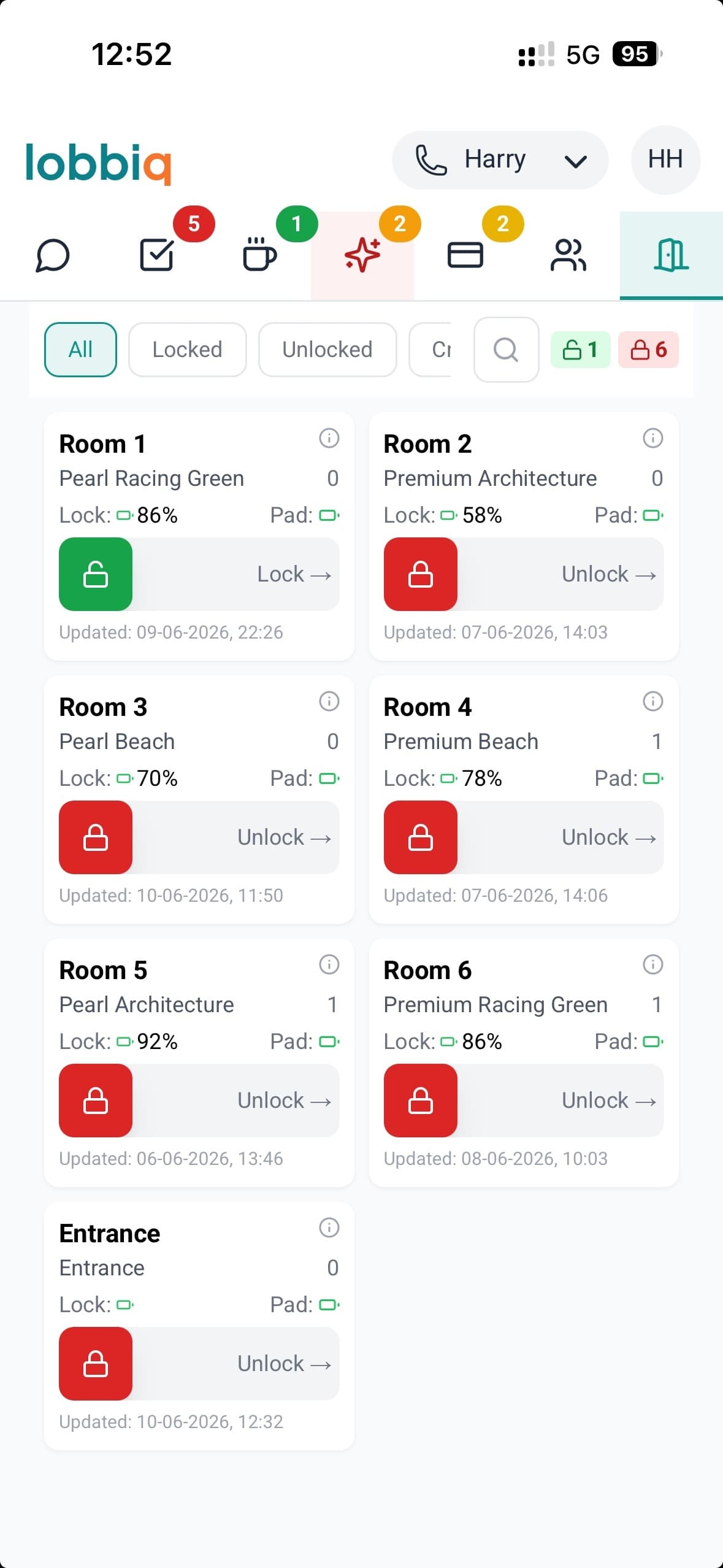
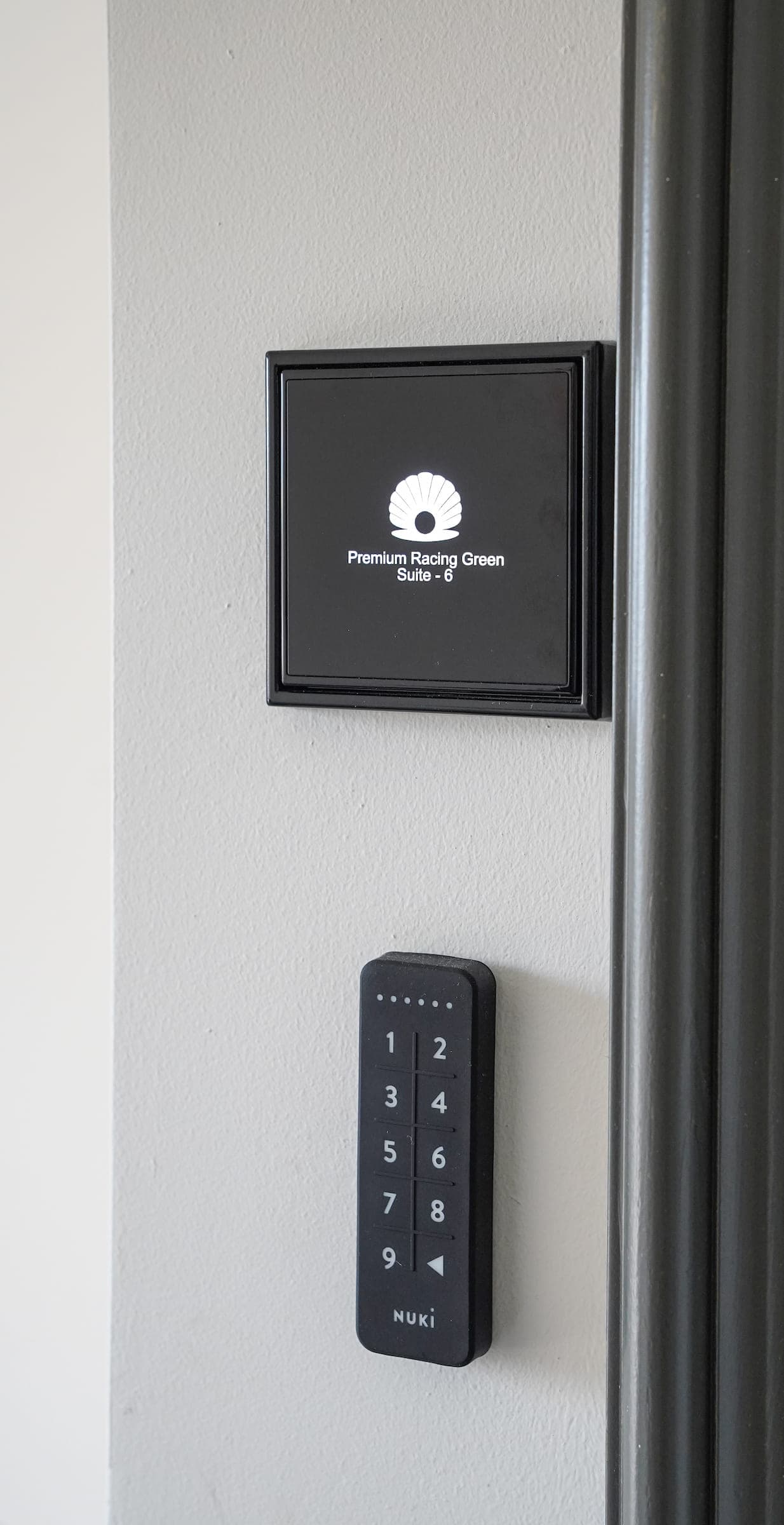
Smart lock integration. Connect the locks you have, or choose from supported hardware. Pick the locks that fit your property.
- Fully automatic lifecycleCodes generate before arrival, deliver via WhatsApp, and delete after checkout. Staff never touch a code.
- Remote control from anywhereSlide to unlock or slide to lock — control any door from your phone. Battery alerts before lockouts.
- PIN backup, alwaysKeypad PIN works even if the app fails. No single point of failure.
- Configurable access timingSet access times per door independently. Entrance from noon, room door from 15 minutes before check-in, departure grace until 18:00. One code, configurable per door.
No key box. No rushing to open the door. Your guests arrive whenever suits them.
Messaging
One Inbox. Every Channel. Every Guest.
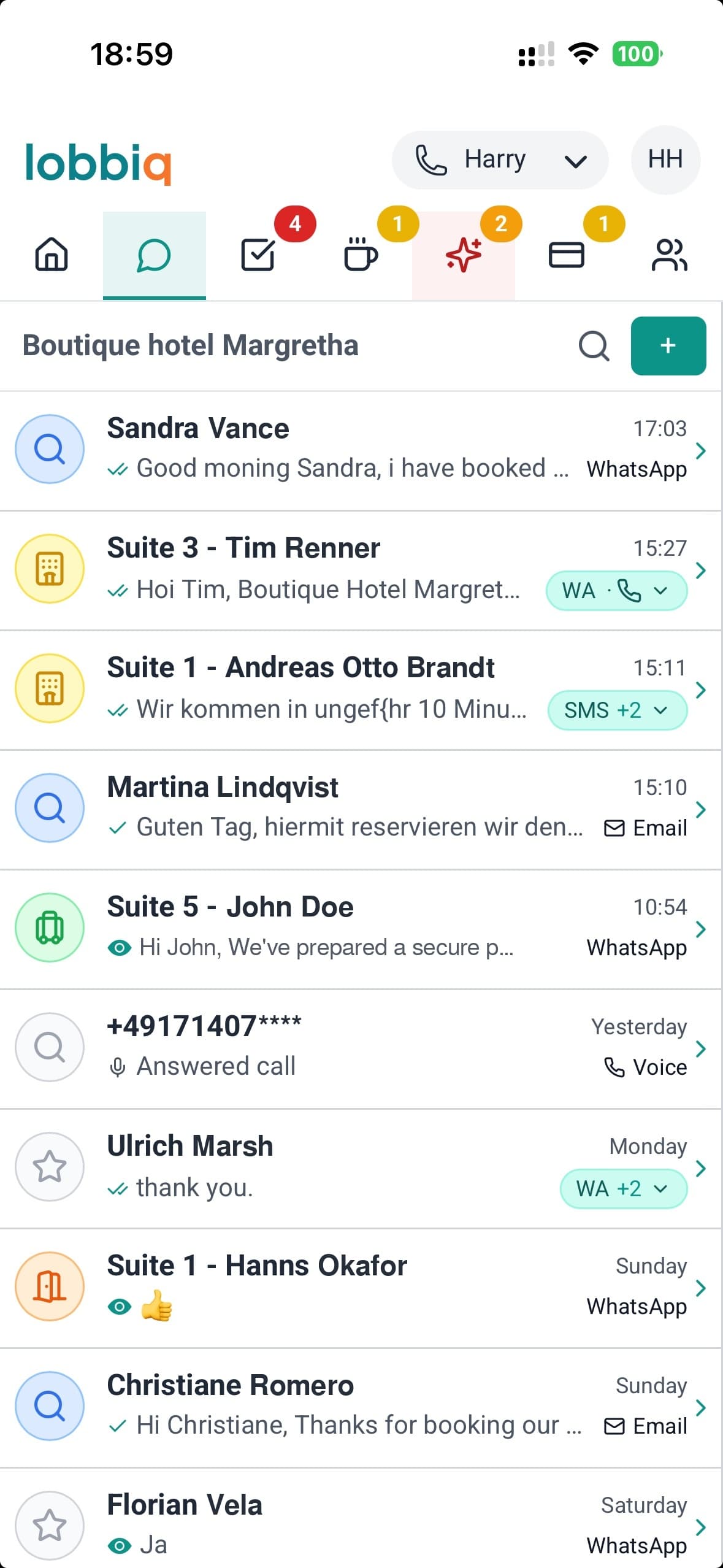
WhatsApp, SMS, email, and voicemail — all in one shared inbox your whole team can see. No more "who has the phone?" No more lost messages during shift changes.
- One thread per guest, not per channelWhatsApp yesterday, a call this morning, a Booking.com message tonight — one conversation, with their room, their dates and where they are in the stay sitting beside it.
- Automatic language detectionA guest writes in German, Lobbiq answers in German. Taken from the booking, and corrected the moment they write to you in something else.
- Templates with personalizationMessages auto-fill guest name, room number, door code, and check-in time.
- Multi-user shared inboxTeam members with access see all messages. Hand a conversation to a manager and everything said so far goes with it — nothing to brief, nothing to repeat.
Short messages, not a wall of text.
The welcome carries the door code and one link — the portal handles the rest. No upsell spam. Configurable to your preference, but experience says guests don't read long messages.
All guest communication in one place. Whether it's WhatsApp, SMS, email, voicemail or a missed call — you see it.
Before they arrive
Nobody arrives without their welcome message.
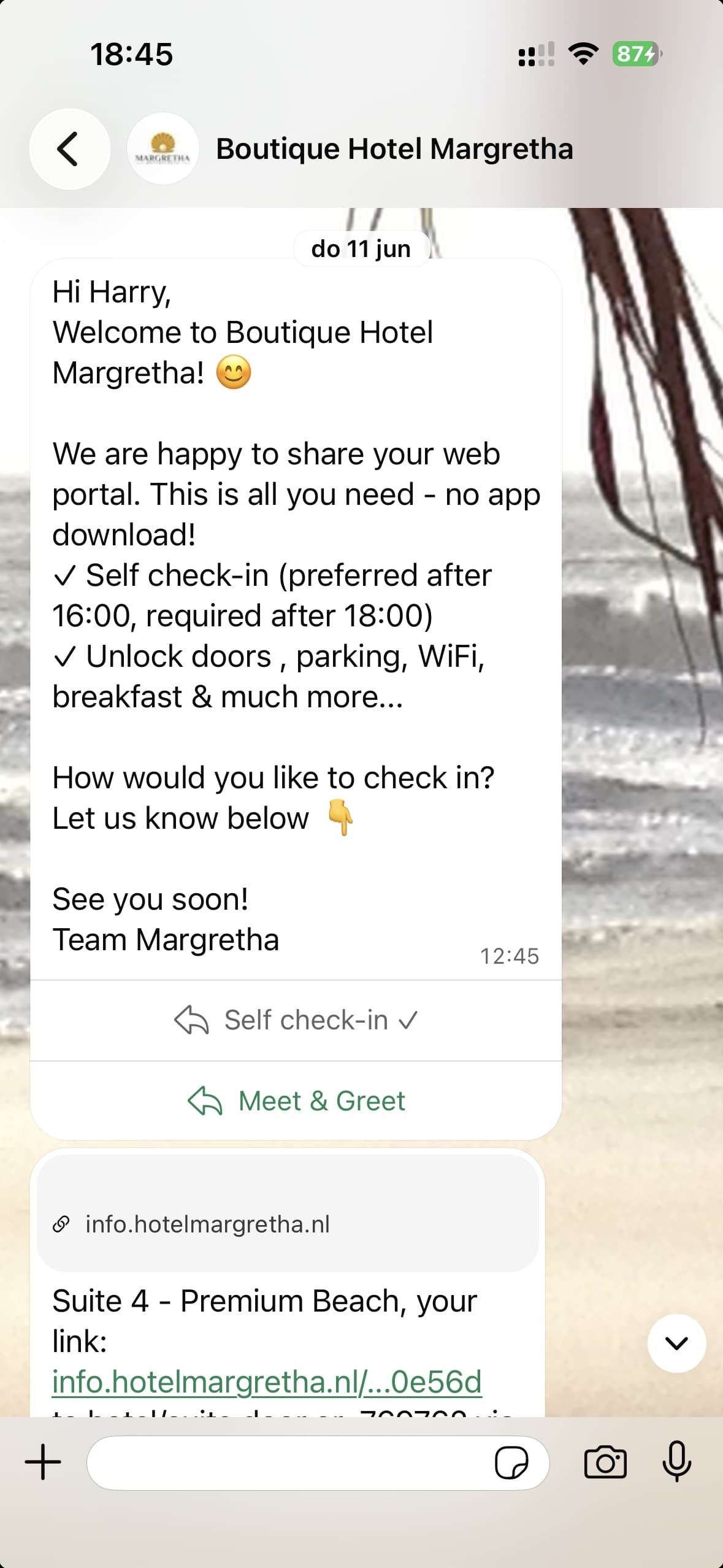
At 10:30 on the day they arrive, the guest gets one personalised welcome message, carrying a door code and portal link for every room they've booked. It goes by WhatsApp; if that fails, by SMS; if that fails, by email.
The message is short on purpose: everything else lives behind the one link, in your own branded guest portal — where they register and sign the house rules on their phone.
Is the number a mobile?
Checked the moment the reservation lands. If it is not a mobile the guest is emailed straight away — while they are still at the screen they booked on, and most likely to answer.
Is there anything to reach them on?
If there is no mobile and no email at all, a conversation opens in red so the front office cannot miss it. The only case that needs a person.
Did it actually arrive?
Any WhatsApp or SMS still showing one tick instead of two goes out again by email. A phone that is switched off never reports a failure, so nothing would have fallen back on its own.
⇄In their own language, or English.
Nobody stands outside wondering whether the code was ever sent.
Payments
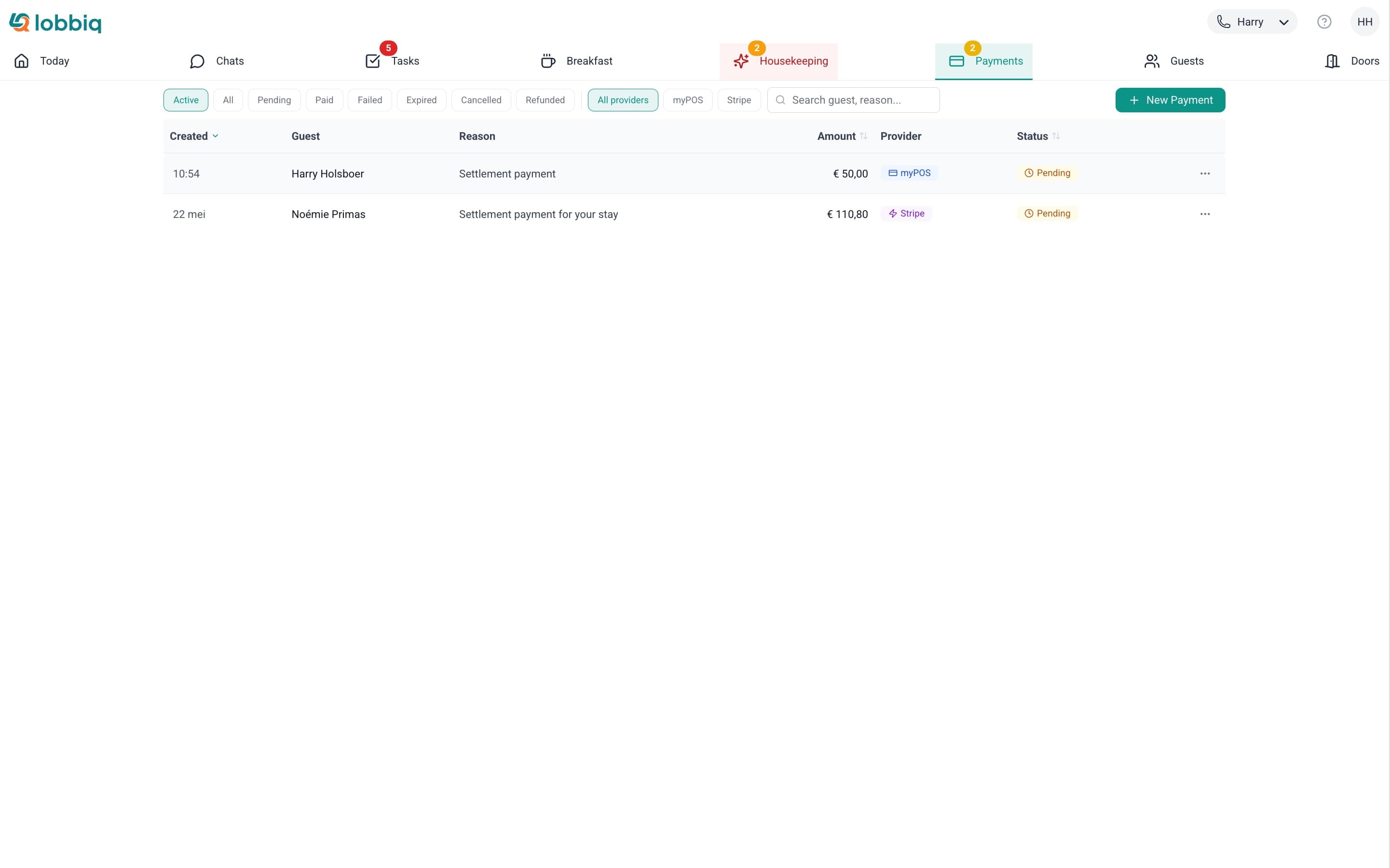
Send a Link. Guest Pays. Zero Commission to Lobbiq.
Generate a payment link, send it via WhatsApp or SMS, guest pays. You use your own payment account and keep everything — zero commission to Lobbiq.
- Zero commission, alwaysMany competitors add 1-3% on top of processor fees. With Lobbiq, your payment account is yours — Lobbiq never touches your money.
- One-tap from conversationGenerate and send a payment link without leaving the guest's chat — or from the payments page.
- Status trackingSee when links are sent, opened, paid, or expired. Automatic reminders for unpaid links — and a failed payment raises an item that clears itself the moment they pay.
- Stripe + myPOSConnect your existing payment provider. No new merchant account needed.
You get paid without chasing. Guests pay without friction.
Guest Portal
Your Hotel in Your Guest's Pocket.
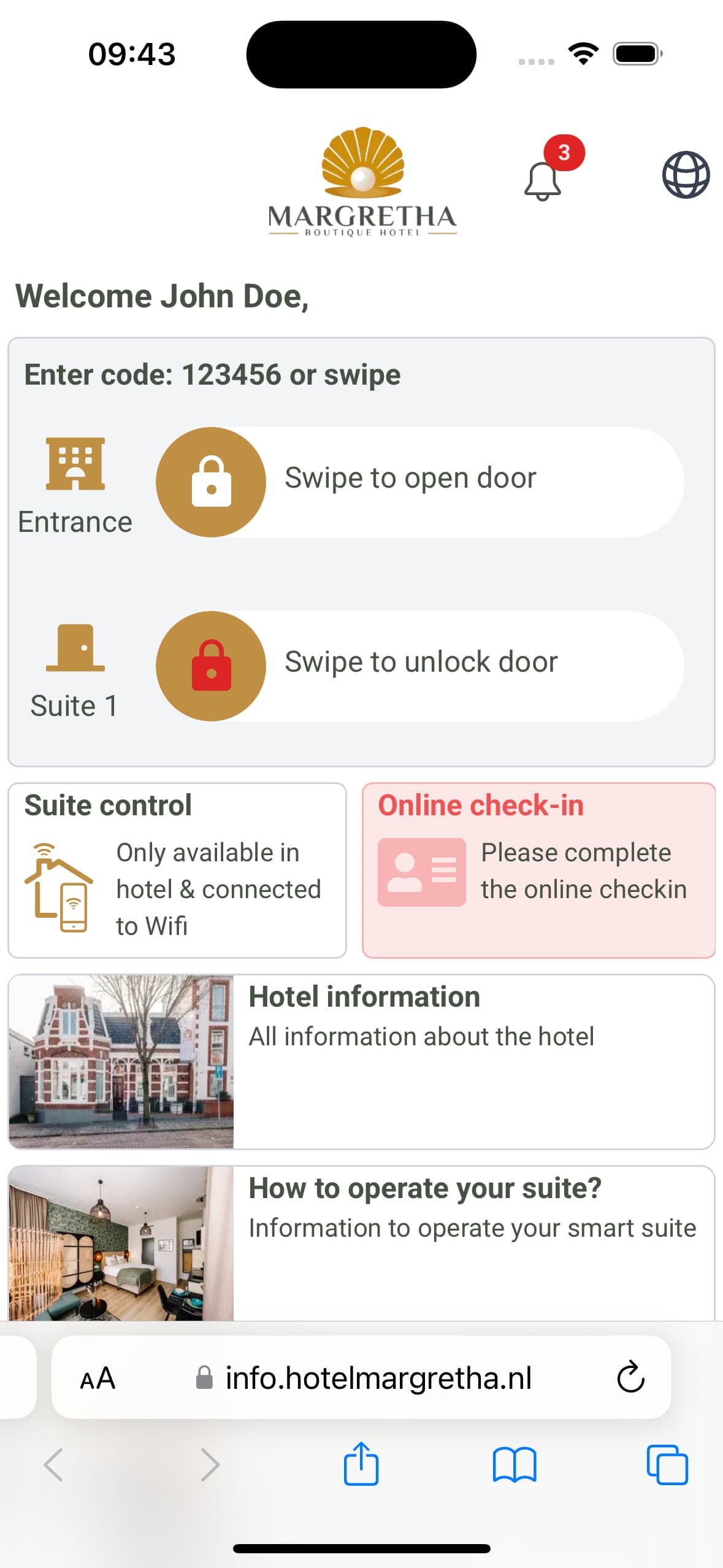
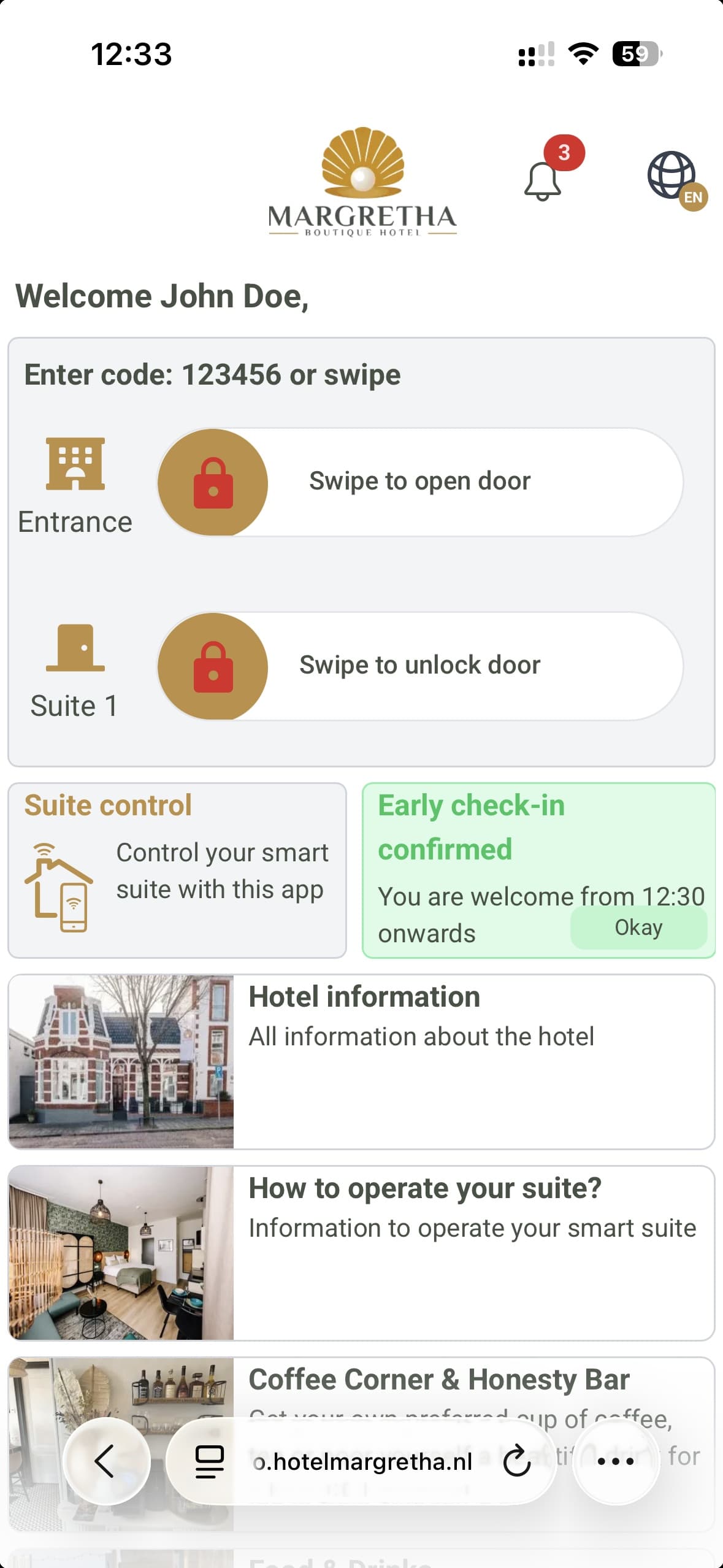
A browser-based guest portal — no app download. Breakfast ordering, service requests with real-time status, door access, WiFi, and hotel info. Adapts to each guest's journey stage.
- Real-time status cardsBlue = pending, green = confirmed, red = declined. Guests always know what's happening with their request.
- Full request trackingSubmitted → Acknowledged → On the Way → Delivered. Guests see progress, staff see prioritized queues.
- In-app upsellingEarly check-in, late checkout, parking — one-tap booking with instant status. Revenue without reception.
- Share with companionsGuests share access via WhatsApp, SMS, email, or QR. Companions get their own door access and breakfast preferences.
Early check-in, parking, breakfast — visible the moment guests open their portal. Revenue through elegance, not push notifications.
Guests stop calling reception. You stop repeating yourself.
Before they book
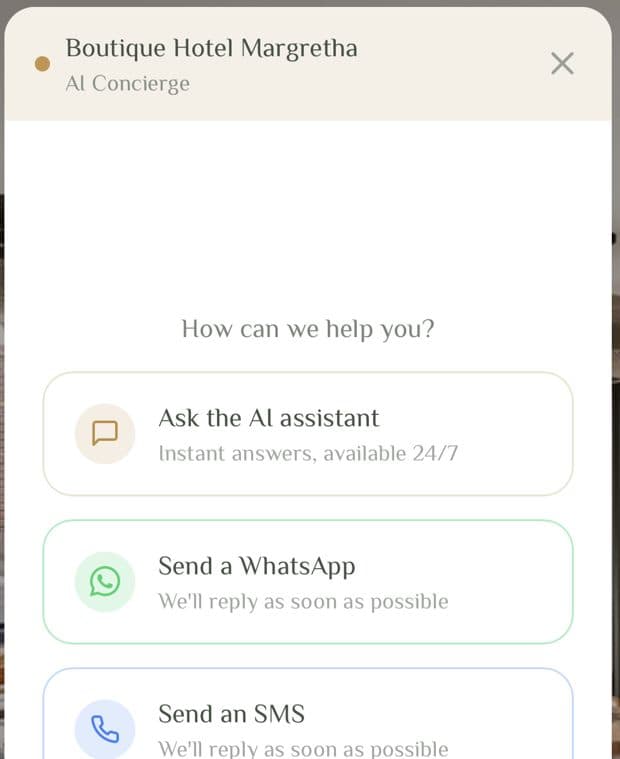
A chat widget on your own website.
Someone is on your website at 23:40 deciding between you and the place down the road. They want to know about parking, whether the room sleeps three, whether you take dogs. Today that goes to a contact form nobody reads until tomorrow — or it never gets asked and they book elsewhere.
Three ways through, and whichever they pick it lands with your team in the same inbox as your WhatsApp, your SMS and your voicemail — not in a second tool somebody has to watch.
Without AI Pro the chat still works — your team answers it instead of the AI.
Your guests get answers. Even when you're asleep.
AI that actually helps. Not AI for the sake of AI.
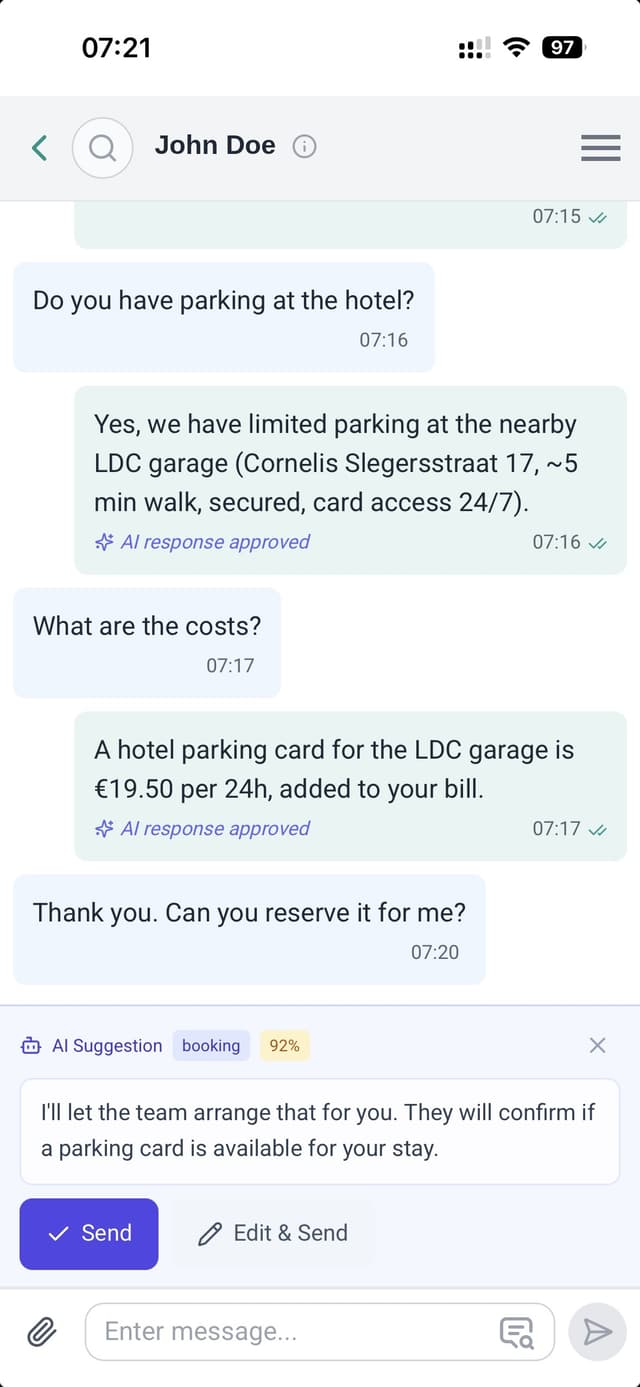
Guest AI
WhatsApp · SMS · email · your website widget
A guest asks about parking at midnight. Wherever that arrives, the AI answers in their own language, from your FAQ and their own booking. Not a generic hotel script. Anything it is unsure of goes to your team.
Staff AI
Your dashboard
"Any early check-ins tomorrow?" "How many breakfasts?" "Who hasn't paid the city tax?" Ask Lobbiq in plain language and get the answer without opening your PMS.
Guest Portal AI
Q4 2026The guest portal, during the stay
Hotel information, restaurant and activity suggestions, answered on the spot in the portal the guest is already holding.
You stay in control.
You set how sure it has to be before it answers on its own, where it leaves a reply waiting in the chat for someone to send or edit first, and where it stays quiet and a person takes over.
Some things it never does alone. A complaint, a refund, anything touching safety — those never go out on their own.
And it starts by only suggesting. Run it against conversations you have already had and read what it would have said, before it answers anyone for real. Then let it loose one subject at a time — parking, then check-in times, then whatever you are happy with — and leave the rest suggesting.
Try it on a real hotel. Right now.
The widget on hotelmargretha.nl is this same AI, running in the hotel Lobbiq was built in. Ask it about parking. Ask it in German. Ask it something it cannot know, and watch what it does.
Open hotelmargretha.nl →Smart Phone Exchange
Keep your hotel's phone number. Never miss a guest call again.
Forward your existing hotel number to Lobbiq — setup takes 15 minutes, reversible anytime. Calls route intelligently, voicemails transcribe automatically, and missed calls become WhatsApp conversations.
During the day
Calls route to the on-duty staff member's mobile — with a push notification showing who's calling, which room they're in, and when they're checking out. Answer with context, not confusion.
After hours
Professional voicemail greets your guest in their own language — Dutch, German, English, French or Spanish — detected automatically from their phone number. Voicemails are transcribed and appear in your inbox.
Missed a call?
Lobbiq automatically sends a WhatsApp message: "Sorry we missed your call. How can we help?" A missed phone call becomes a conversation — nothing falls through.
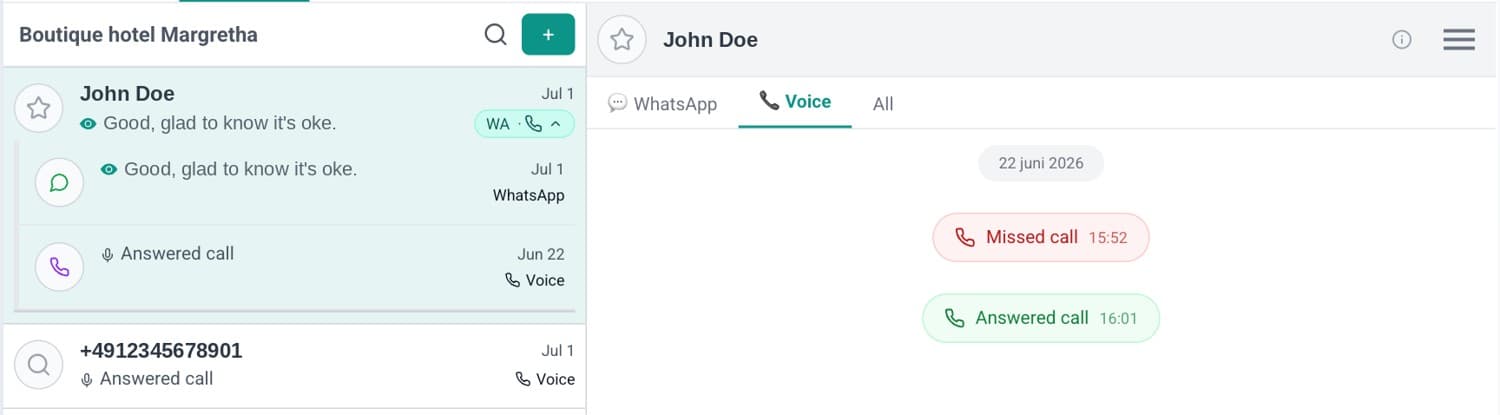
You keep your hotel number. You never miss a guest call. Your private number stays private.
Press 9 at any time to bypass the system and connect directly. For the calls that can't wait.
"Goedemorgen... Guten Tag... Bonsoir..." — time-of-day greetings in your guest's language.
No PBX. No hardware. Included in your subscription.
Breakfast & kitchen
Every croissant accounted for. Every guest remembered.
Breakfast is the only part of your hotel with no record. The room has one. The payment has one. Every message has one. Breakfast is a tray and a guess — and you never find out what any one guest actually had.
Still running a buffet?You restock at 9:40. At 10:05 it goes in the bin.
You over-produce on purpose.
Nobody runs a thin buffet by accident. Running out in front of a guest costs more than throwing food away, so the safe move is always to put out more.
And the waste isn't made at the tray. You bought it on Thursday, for a Sunday you couldn't see. Next Thursday you order the same again, because you still don't know.
Who decides
| What gets made | What's on the plate | |
|---|---|---|
| A buffet | You — guessing | The guest |
| Plated or pre-prepared | You — to a count | You |
| With Lobbiq | The guest's own orders | The guest |
A buffet and a plated breakfast each fix one half and break the other. This is the only row where the same person decides both.
What actually happens
Nobody wants to throw food away — not you, and not them. Given the choice, guests take themselves off the mornings they won't be there, and switch off the things they were never going to eat.
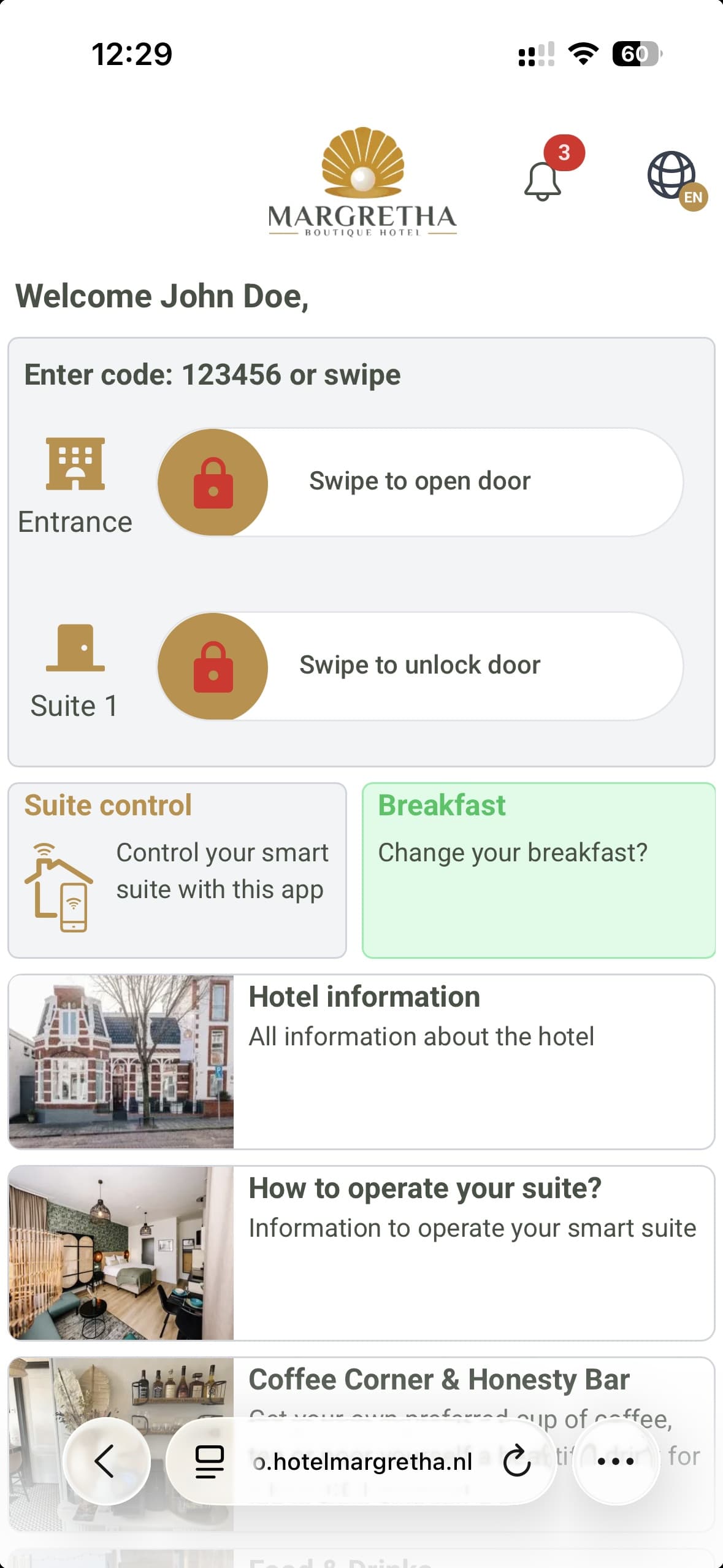
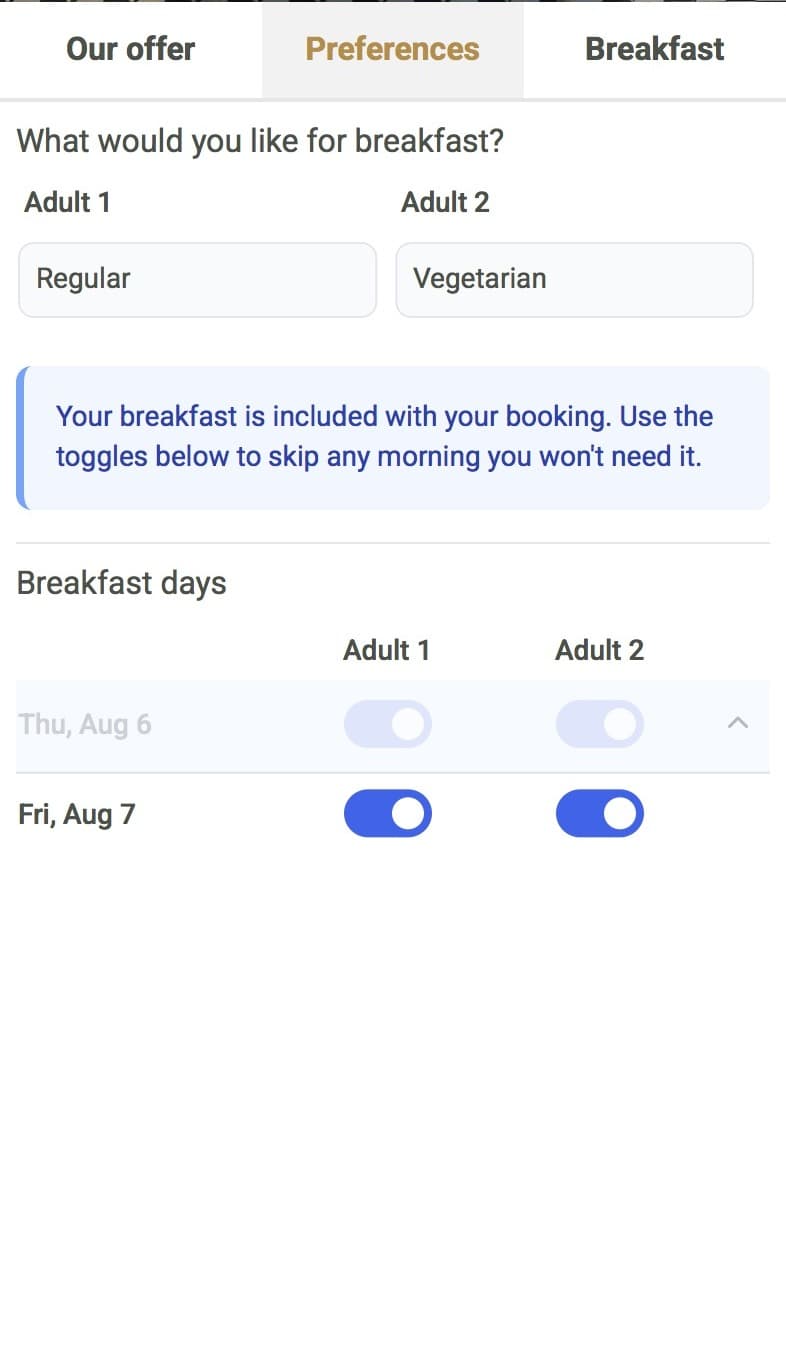
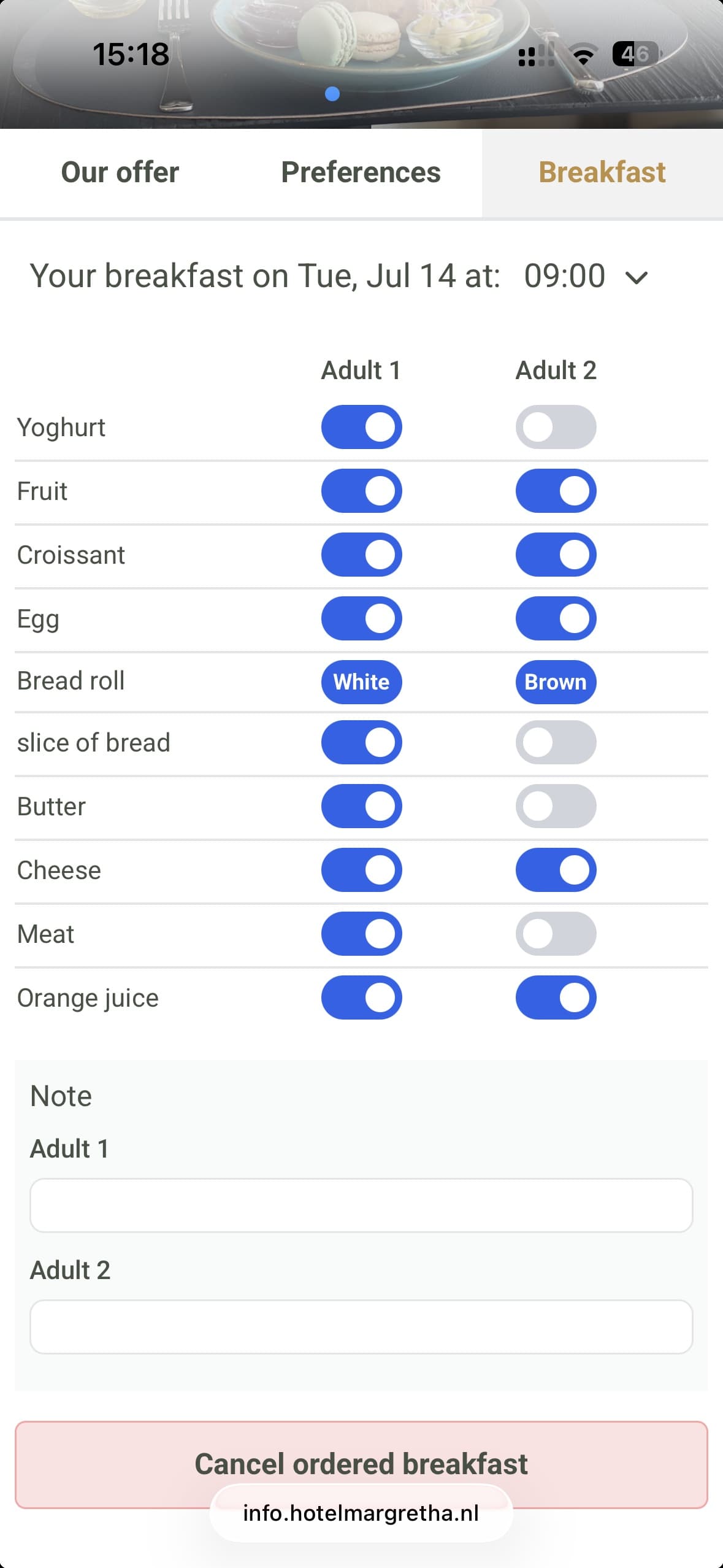
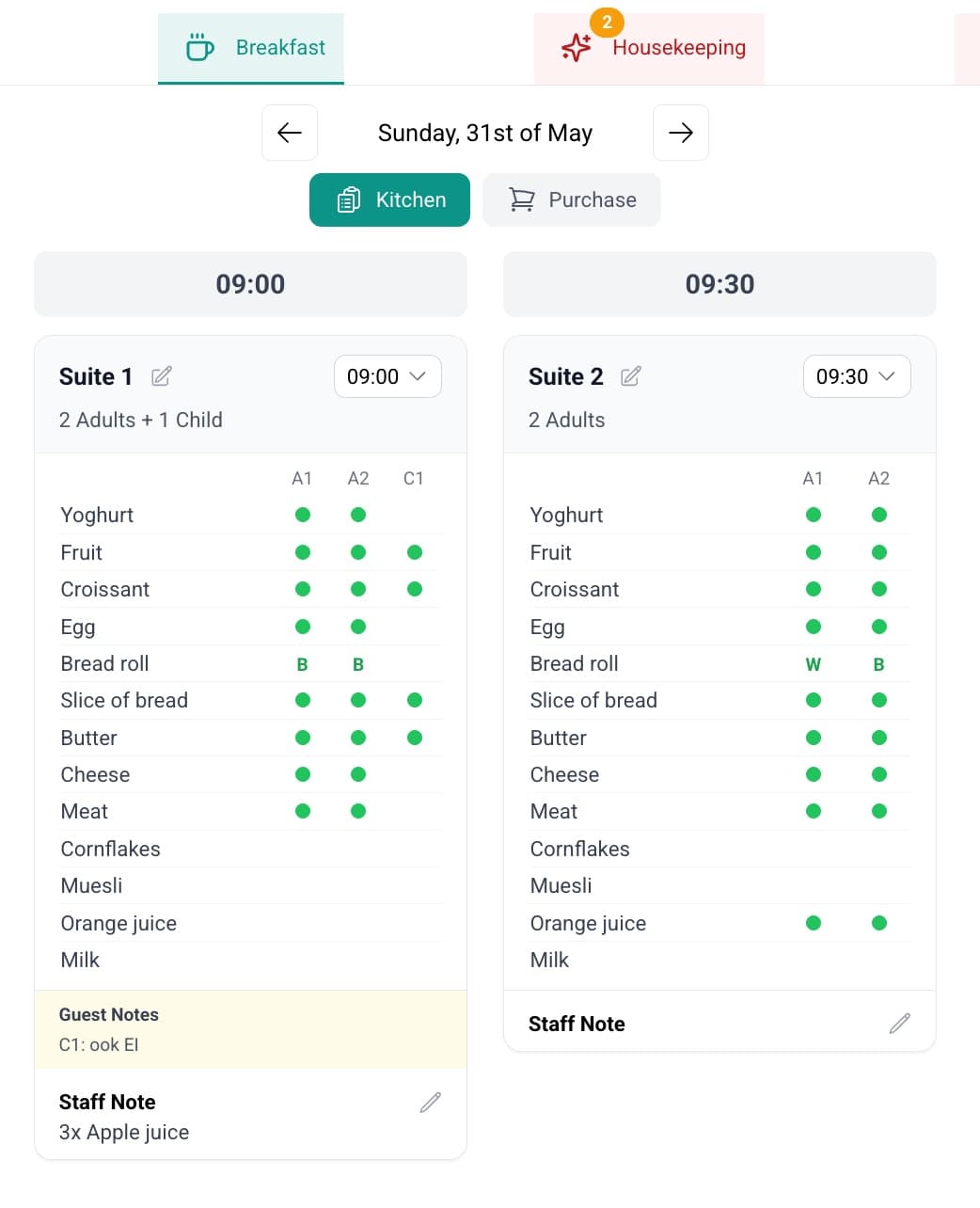
- Two decisions, not oneWhether — skip a morning entirely, per person, per day. And what — which items, per person, per morning. Breakfast inside a Booking.com rate can't be taken off the booking, but a guest can still skip a morning they won't need.
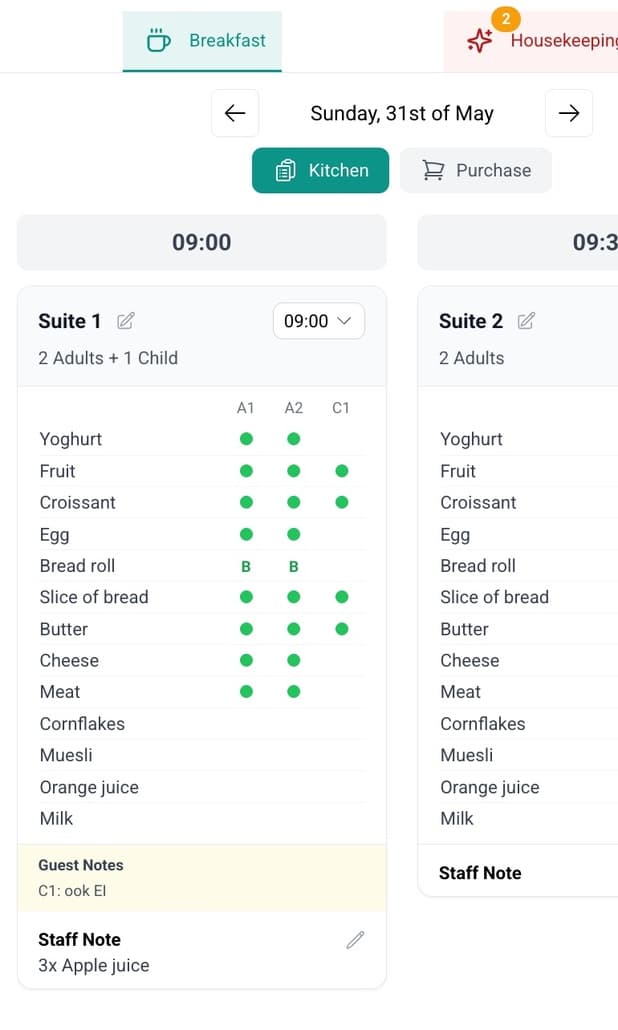
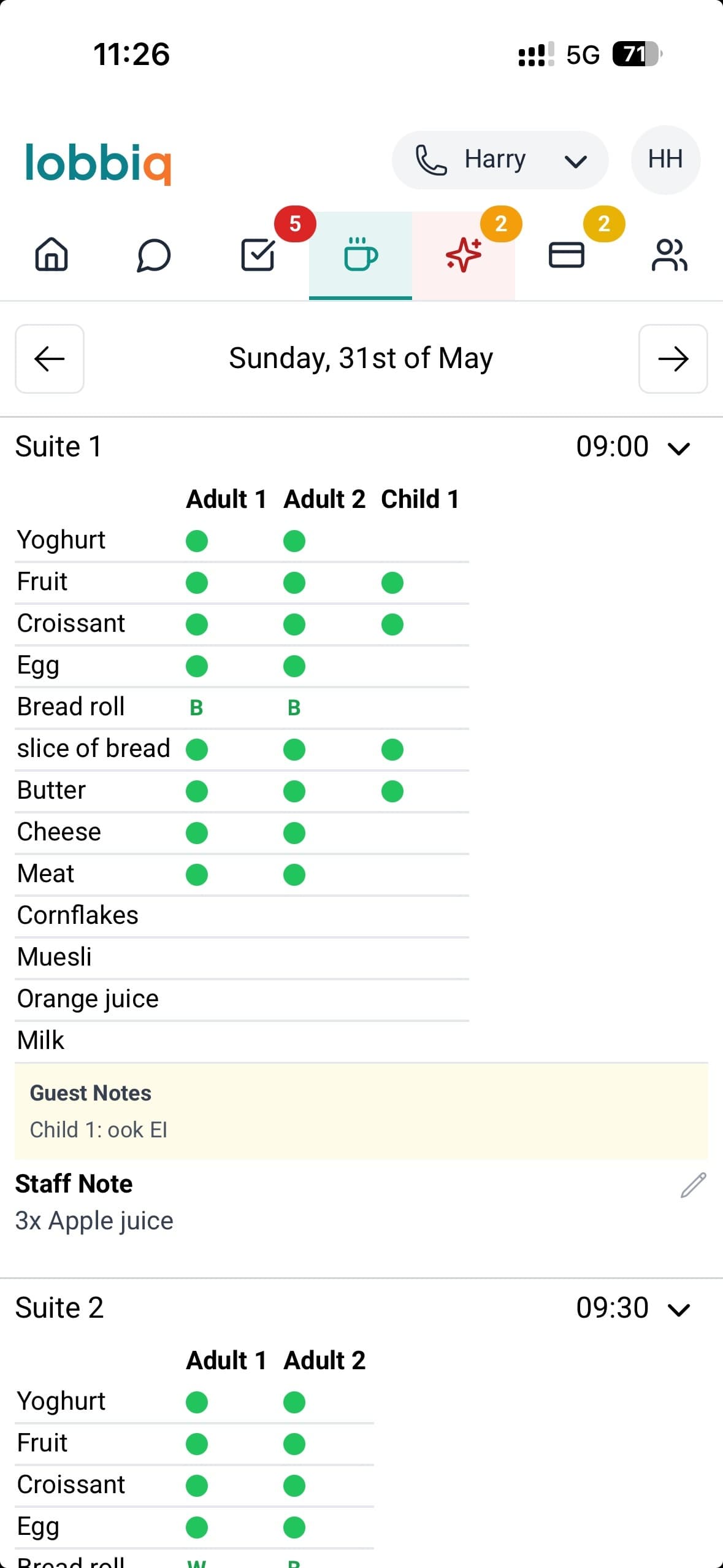
- The kitchen reads, it doesn't forecastGrouped by serving time and room, in 15-minute slots from 08:00 to 11:00. A late change is badged so nothing surprises the pass — and the same grid is on your phone, wherever you are.
- Notes for what the list doesn't haveThe guest types theirs; your team types yours. 3x Apple juice reaches the kitchen even though apple juice isn't on the list.
- The shopping list writes itselfA purchase view aggregates every order into a categorised, printable list. You buy from the list, not from memory.
- Your menu, per weekday and seasonSunday isn't Tuesday, and June isn't January. You set what can be ordered, so you set what has to be bought.
- Changes without a conversationTwo cut-offs you configure — one for the serving time, one for the items. After the time cut-off a guest can always move later, and can only move earlier into a service already running.
“We have much less waste than we used to — and guests use it far more than we expected.”
Harry · Boutique Hotel Margretha, Zandvoort
One accurate count, every morning. Nobody over-cooks.
Tasks
Nobody typed this list.
The things that need doing, written by the things that happened.
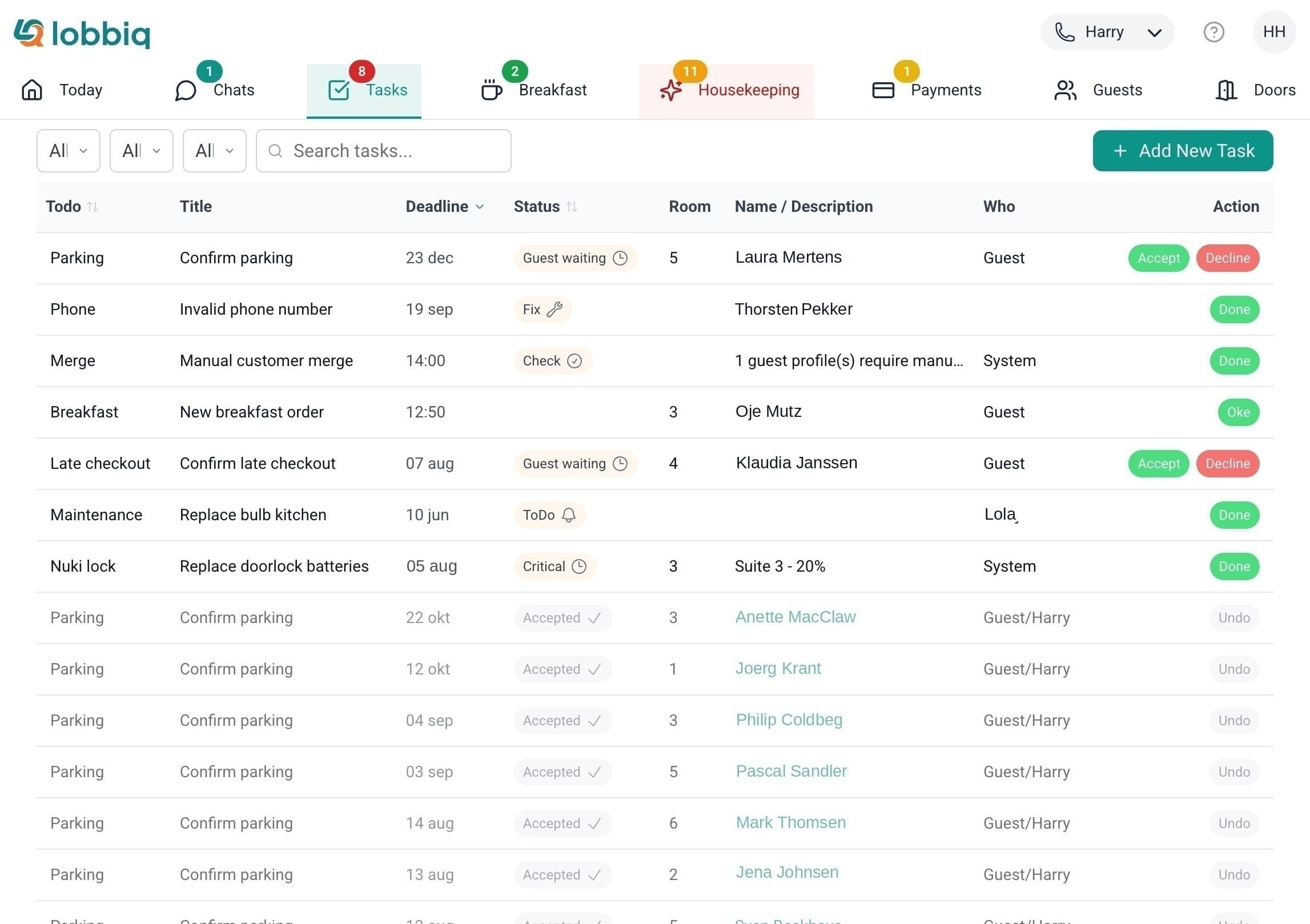
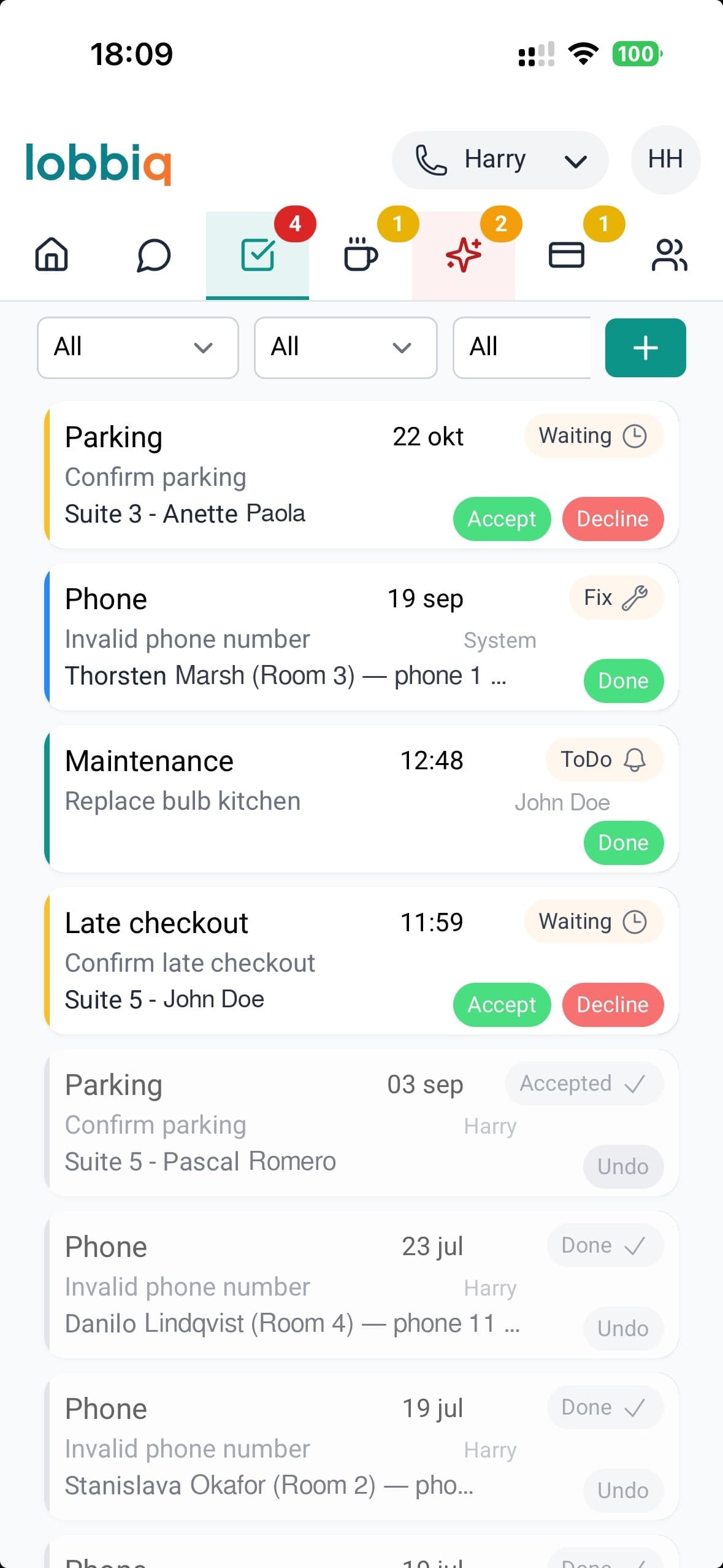
Open the task list on a normal morning and look at the column showing who created each job. A guest asked for parking. A welcome message found a phone number that doesn't work. Two guest profiles turned out to be the same person. A door lock dropped to 20%.
Everything on that list arrived by itself. Except one line — replace the bulb in the kitchen.
It fills itself.
A welcome message that reaches nobody, a door code that won't generate, a duplicate guest profile, a battery at 20%, a guest asking for a late checkout — each arrives with the room, the guest and the deadline already on it.
The buttons do the work.
Accept a late checkout and Lobbiq writes the reservation flag and moves the smart-lock window in the same action. The guest's card turns green on their phone. You never opened anything else.
It chases itself.
A guest request nobody picks up moves on by itself — five minutes to the next person, fifteen to the supervisor, thirty to the manager. Overdue work is badged, and you are pushed when something is created or genuinely changes, not every time it is touched.
Nothing waits for you to remember it.
Today Dashboard
One screen. Only what actually needs you.
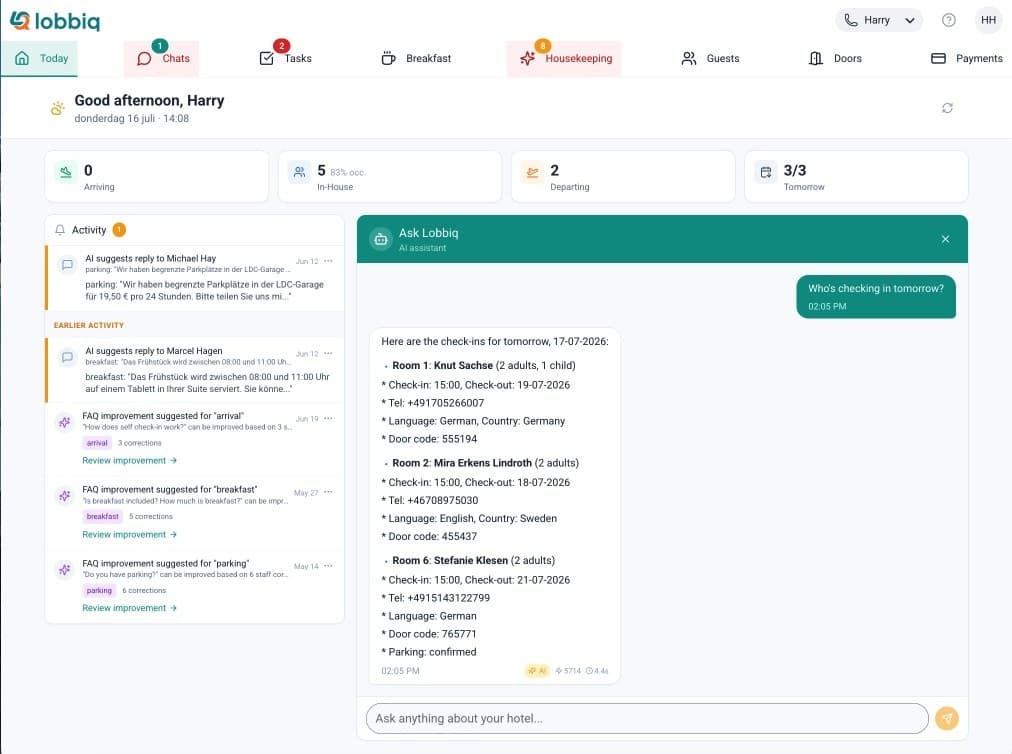
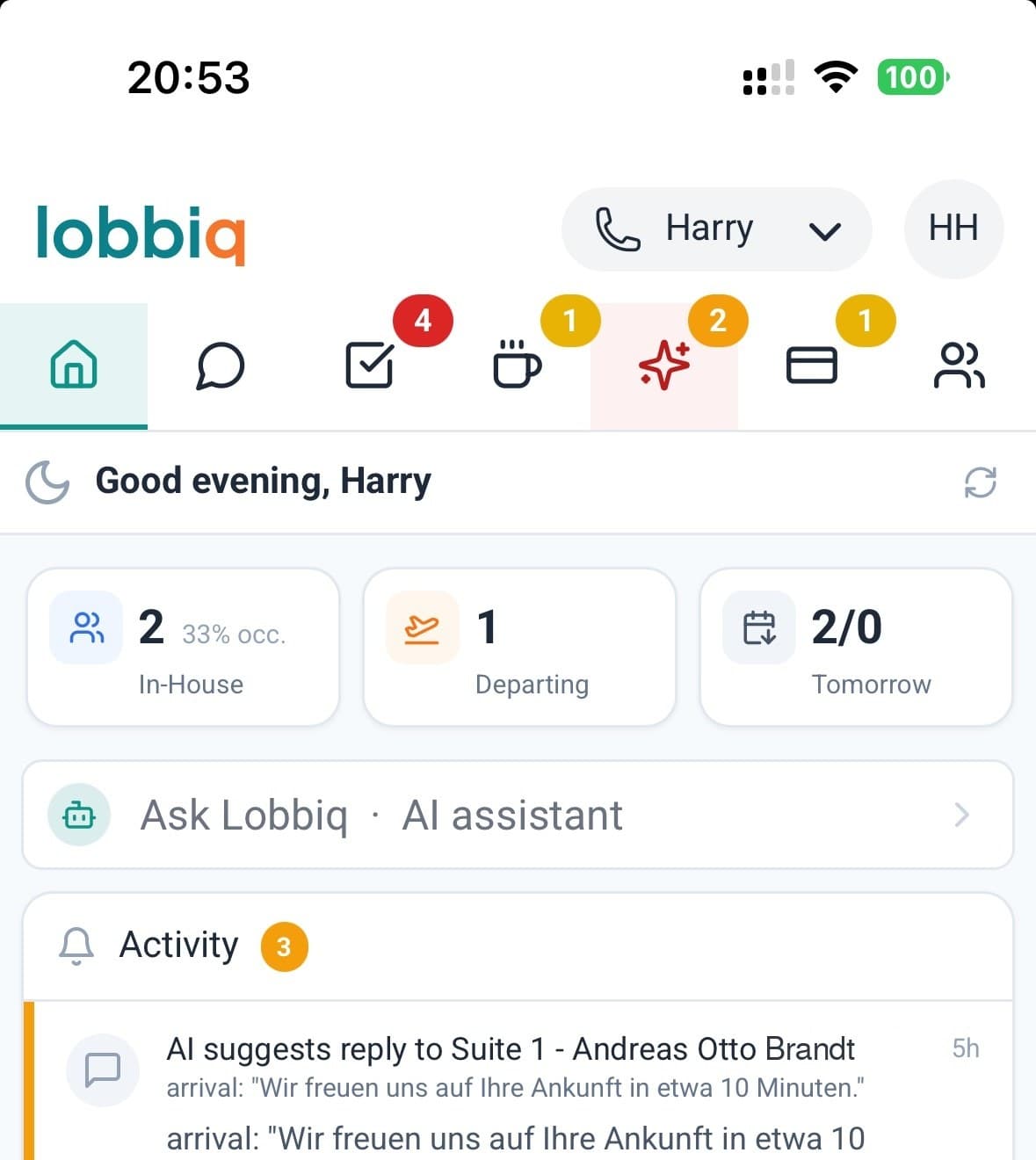
Arriving, in-house, departing, tomorrow — four numbers you can click straight through to names, rooms and times. Underneath, only the things that need a decision from a person.
- Four numbers, and every one of them opensArriving, in-house with occupancy, departing, and tomorrow. Click any of them and you get the names, the rooms and the times — not a count you then have to go and look up.
- The awkward details are already badgedOver capacity, pet, VIP, accessibility, occasion, same-day turnaround, a cancellation struck through. Dietary shows first and is styled for safety — it is the one nobody can afford to scroll past.
- A feed of what needs deciding, and only thatTen conditions close their own items the moment they resolve, so nothing lingers after it stops mattering. You choose, per alert type, whether it appears in the feed, on the cards, both, or not at all.
- Or just ask itAI Pro"Who's checking in tomorrow?" — and it answers from live data: rooms, names, times, languages, door codes, whether parking is confirmed. From your phone, in the kitchen, without opening the PMS.
Nothing about today has to be looked up.
Housekeeping
The cleaning schedule fills itself in. Days ahead.
Every reservation generates its own cleaning tasks — checkout cleans and stayover cleans, deduplicated and prioritised. A booking made three weeks out already has its clean scheduled. Cancel it, and the clean disappears again before anyone wastes a trip.
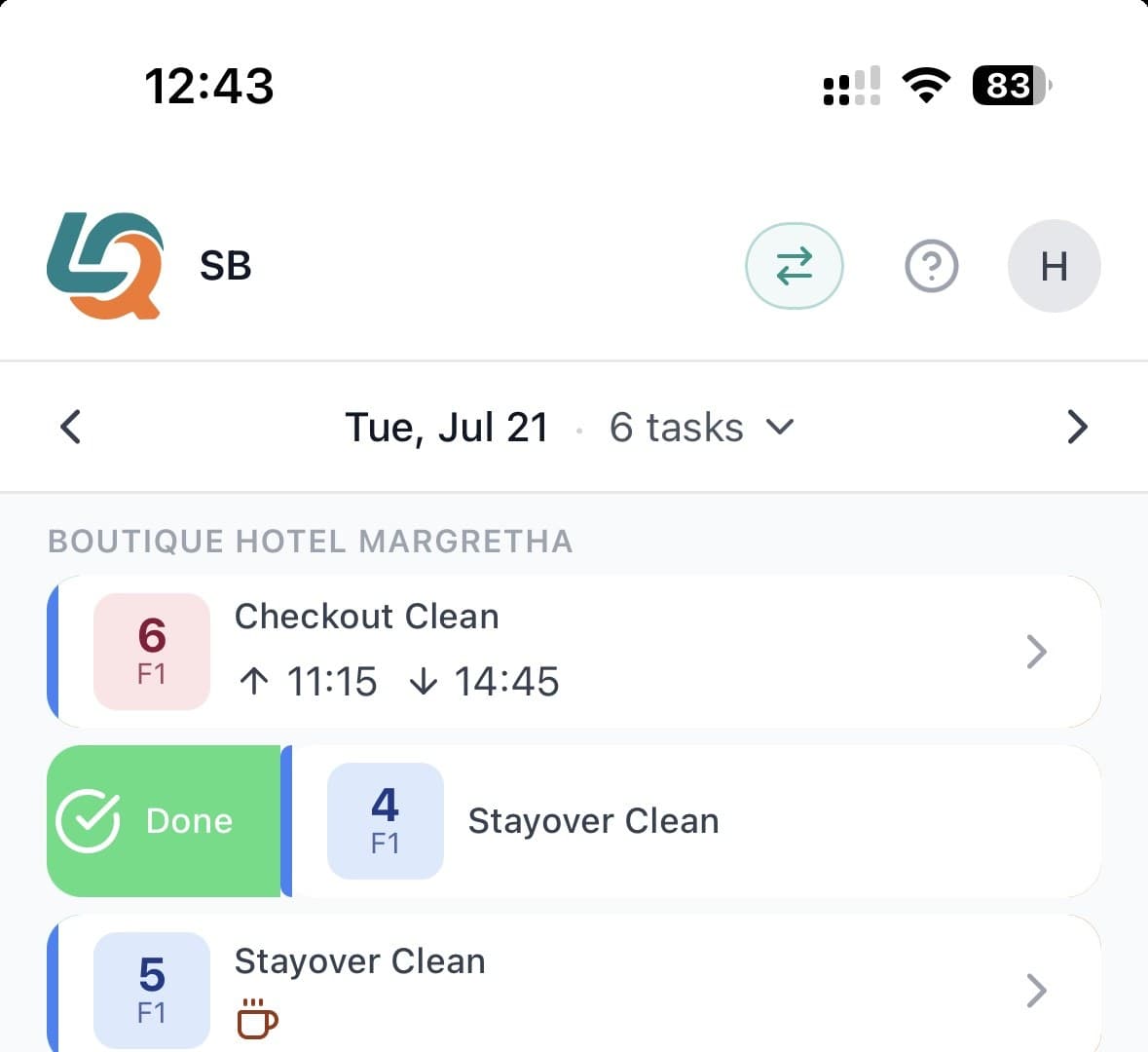
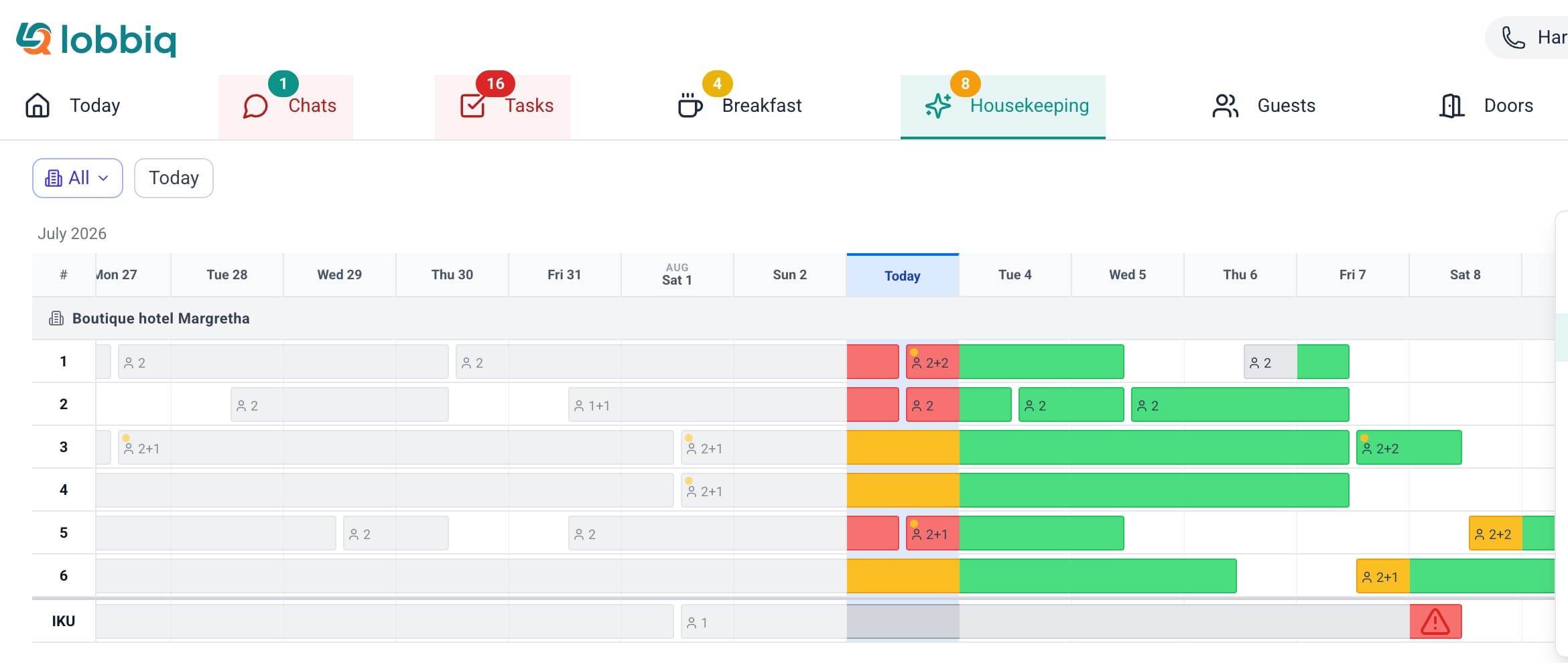
Staff app: one list per housekeeper · Dashboard: the schedule, days ahead
- A rolling window, not a morning listAt 06:00 the schedule tops itself up across your planning horizon — today, the next 7 days, or the next 14 — creating only what isn't there yet. The window ahead of you stays full.
- Your cleaners need no appThey log in with a PIN on their own phone, in their own language — English, Dutch, German, Russian or Ukrainian. Swipe to start, work the checklist, log the minibar, report damage with a photo. No install, no per-seat fee.
- The booking changes, the schedule followsA date change reschedules the clean. A room change moves it. A cancellation removes it. An early checkout skips the remaining stayovers. None of it needs a person.
- The room goes green, and everyone knowsFinish a room and the status changes on the board, a notification lands, and the clean shows inside that guest's own conversation. Someone asked whether their room is ready — whoever picks up the message can already see that it is.
- The guest decides when you go inDo Not Disturb and Make Up Room, set by the guest from their own phone. Do Not Disturb takes that day's stayover clean off the assignments and clears itself on the checkout date — a checkout clean is never suppressed. Make Up Room raises the task, and it closes when the room is done.
- Your cleaning company, without your guest dataDelegate to an external company and they see the work, not your guests — surname, email, phone and reservation ID are stripped before it reaches them. One cleaner working across several of your properties sees a single list.
Rules, not AI. Assignment matches on task type and weekday, in the order you set, resolving to a role and then to that day's roster — and a manual override is never undone by the engine. You can read the rule, change it, and predict the outcome. Task generation is included on every tier; the Assignment Engine that allocates work automatically is part of Housekeeping Pro, a paid add-on.
Your cleaning team knows exactly what to do next. You stop being the coordinator.
Full platform
And that's just the start.
All of the following is included in every plan. Add smart locks, AI or housekeeping only when you need them.
Nothing Falls Through the Cracks.
Tasks linked to reservations, guests, and conversations. Guest-waiting items auto-prioritize. Shift handoffs are automatic — tasks belong to roles, not people.
Hotel-context task management
Nothing waits for you to remember it.
If it can be automated, it is.
If it can be automated, it is. Every step in the guest journey and every task for your team — triggered automatically at the right moment. Completed tasks resolve and disappear. No manual follow-up needed.
Set and forget
CMS Page Builder
Build and manage your guest-facing content without a developer. Use building blocks to create your own style. Hotel info, local tips, house rules, upsell pages — all multilingual, all live in the guest portal the moment you save.
Visual drag-and-drop editor
Analytics & Reporting
Guest portal usage, messaging response times, housekeeping performance, AI costs, system health.
Five specialized dashboards
Notifications & Templates
Pre-written message templates with auto-personalization. One template works across WhatsApp, SMS, and email.
WhatsApp-compliant templates
Guest Profiles & History
They book again next year and their stay history and preferences are already there — recognised automatically. No rekeying, no asking whether they have stayed with you before.
Recognised on the next booking
One subscription. One login. One platform that actually talks to itself.
Integrations
Keep your PMS. Add what it's missing.
Lobbiq runs on top of your existing booking system. Your reservations stay where they are — Lobbiq handles everything that happens after the booking: messaging, access, payments, housekeeping, and the guest experience.
Use case
On-site. Hybrid. Or fully remote.
Lobbiq supports every operation model. Most hotels use a mix — staffed during the day, automated at night. You decide what works for your property.
| Traditional | With Lobbiq |
|---|---|
| Call hotel to arrange early check-in or parking | Request services in the guest portal, with status updating within seconds |
| Wait at front desk, collect key, get directions | Walk from car to room — phone unlocks entrance and suite door |
| Call reception for the WiFi password or breakfast times | WiFi in one tap, breakfast preferences per person, per day |
| Call and hope someone picks up | Book early check-in, late checkout or parking in the portal — status colour-coded, updating within seconds |
| Queue at checkout desk, return key | Close the door and leave — access deactivates automatically |
Staff aren't replaced — they're freed from repetitive tasks to focus on moments where human interaction actually adds value.
Book a Demo →Whether you are on-site or not — the hotel runs.
See it all in action.
Every feature. One platform. From €37.95/month. No commitment needed — just a conversation.
Book a Demo →