Platform
Finally, everything works together.
Smart locks, messaging, guest portal, payments, housekeeping, breakfast and AI come together in one platform, with one subscription instead of five. Every feature is included. The only extras are what our suppliers charge us, for smart locks, the AI Concierge and Ask Lobbiq, and phone, SMS and WhatsApp usage.
Today Dashboard
One screen. Only what actually needs you.
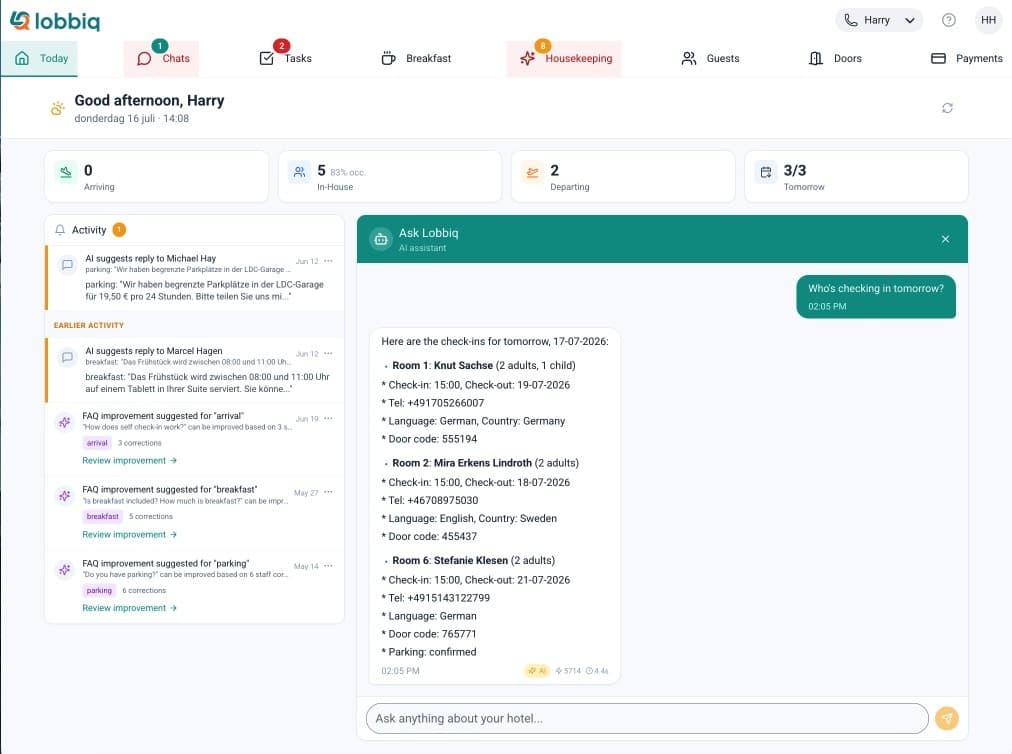
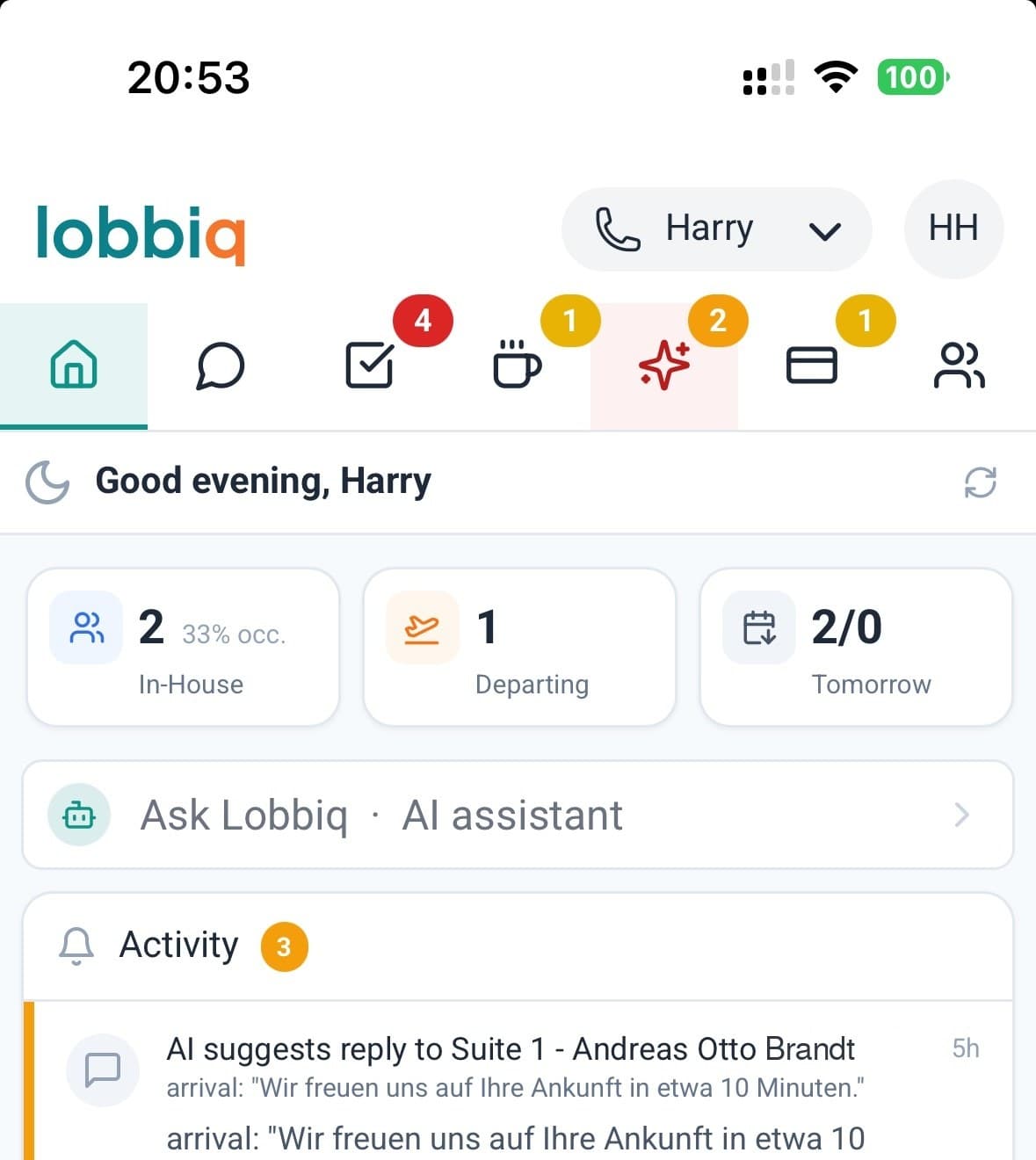
A booking system shows you reservations. Lobbiq shows you your day: arriving, in-house, departing and tomorrow, four numbers you click through to names, rooms and times. Below them, only the things that need a decision or your attention.
Arrivals, stays and departures at a glance
At the top you see who is arriving, in-house and departing today, how full you are tonight, and who is leaving and arriving tomorrow. Click a number and you see who they are, which room they are in and what time. When someone checks in, you see it straight away.
The tricky details are already there, no searching
Lobbiq reads the notes on every booking and puts what stands out right next to the guest, from dietary needs to a pet. Extras like parking or a cot are visible at a glance.
The most urgent comes first
A failed payment, a voicemail, a booking for today: it all goes into one list. Once it's resolved, the alert disappears on its own, for your colleagues too. You choose which alerts you want to see.
- + AI fee
Or just ask Lobbiq
Who's checking in tomorrow? How many breakfasts does the kitchen need to prepare? Are there any open tasks? Ask in your own language and get an instant answer about guests, rooms, occupancy, breakfast, tasks and payments, without opening your booking system.
Before they book
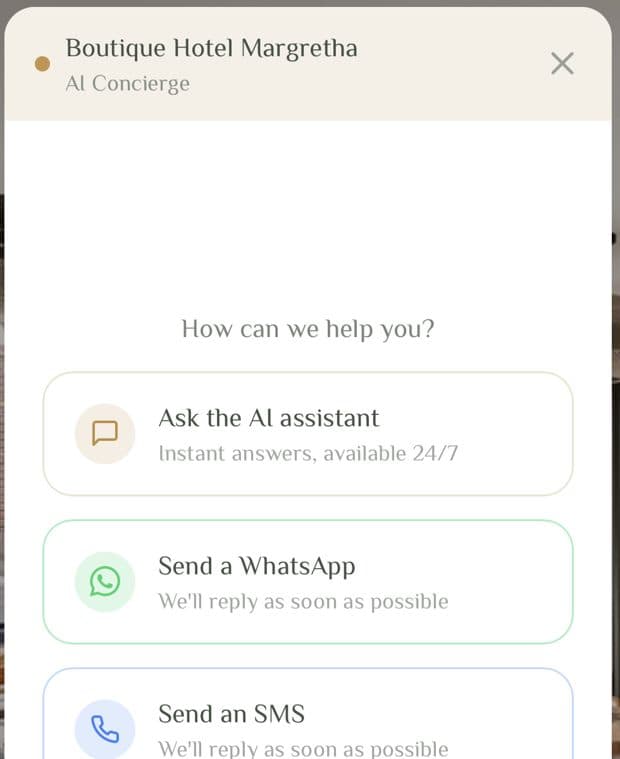
A chat widget on your own website.
Someone is on your website at 23:40 deciding between you and the place down the road. They want to know about parking, whether the room sleeps three, whether you take dogs. Today that goes to a contact form nobody reads until tomorrow, or it never gets asked and they book elsewhere.
Visitors choose how to get in touch: with the AI assistant, on WhatsApp or by SMS. Everything arrives in your usual chat inbox, not in a second tool somebody has to watch.
If the guest picks the AI assistant, they get an answer straight away, even to whether there's still a room available.
The chat works without AI too. Your team then answers the questions itself.
Before they arrive
Nobody arrives without their welcome message.
At 10:30 on the day they arrive, the guest gets one personalised welcome message, carrying a door code and portal link for every room they've booked. It goes by WhatsApp; if that fails, by SMS; if that fails, by email.
- At booking
Is the number a mobile?
Checked the moment the reservation lands. If it is not a mobile the guest is emailed straight away, while they are still at the screen they booked on, and most likely to answer.
- 10:30, arrival day
Is there anything to reach them on?
If there is no mobile and no email at all, a conversation opens in red so the front office cannot miss it. The only case that needs a person.
- 14:30, arrival day
Did it actually arrive?
Any WhatsApp or SMS not yet reported as delivered goes out again by email. A phone that is switched off never reports a failure, so nothing would have fallen back on its own.
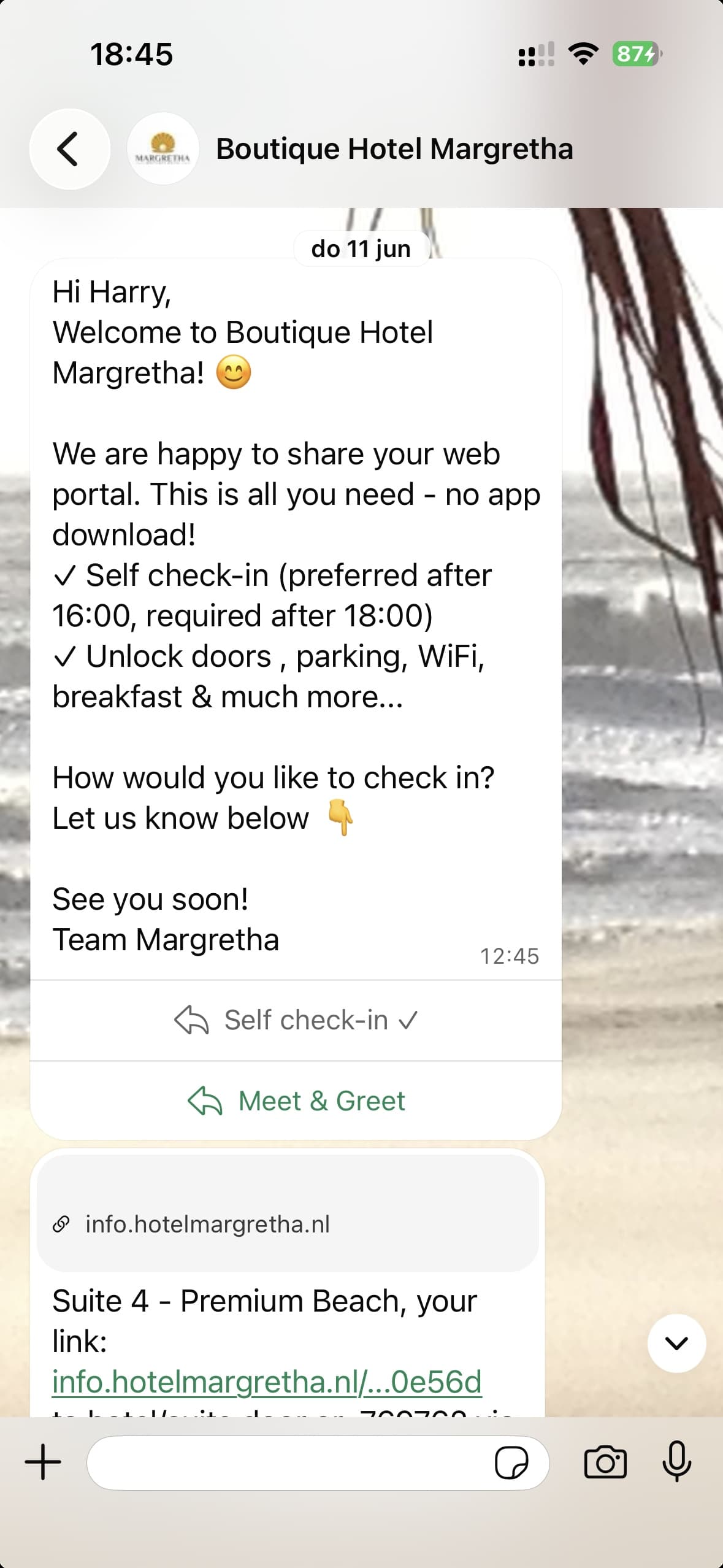 Short, no upsellSelf check-in or Meet & GreetDoor code and portal link
Short messages, not a wall of text.
The welcome message is short on purpose. Extras, information, registration and the house rules live in your own branded guest portal. So the guest gets no upsell over WhatsApp, and reads what matters. You can change it yourself, but experience shows: guests don't read long messages.
You always know whether the door code has arrived, before the guest is even at the door.
Smart Locks
Your phone is your room key.
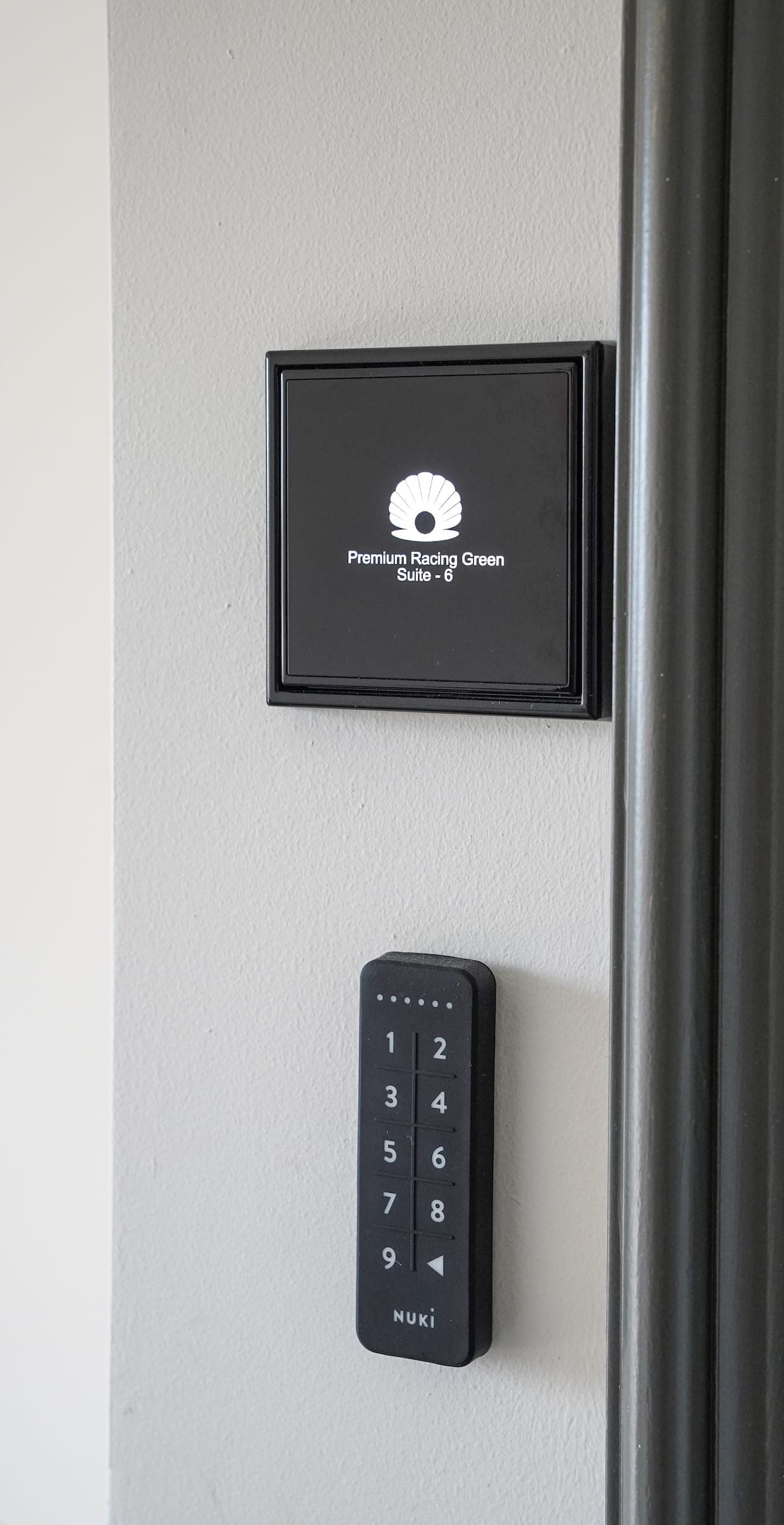
Connect the smart locks you already have, or choose from supported locks that suit your property.
- Fully automatic lifecycleA code for the assigned door(s) is generated before arrival, sent with the welcome message and expires automatically after checkout. Staff never touch a code.
- Remote control from anywhereSlide to unlock or lock, in the Lobbiq app and, for guests, in their guest portal. You get a warning before a battery runs low.
- Always a way inGuests open the door with a swipe in the guest portal or with their code on the lock. If that still doesn't work, the guest calls your property and opens the door through the emergency menu with their own code, without anyone on your team having to do a thing.
- Configurable access timingSet access times per door. For example, the main entrance from 12:00 on the arrival date until 18:00 on the departure date, and the room door from 15 minutes before check-in.
No key box. No rushing to open the door. Your guests arrive whenever suits them.
No smart locks yet?
Our partner Slimme Deursloten advises which lock suits your door, and installs it too. They work with brands including Nuki, Tedee and DOM.
Visit Slimme Deursloten →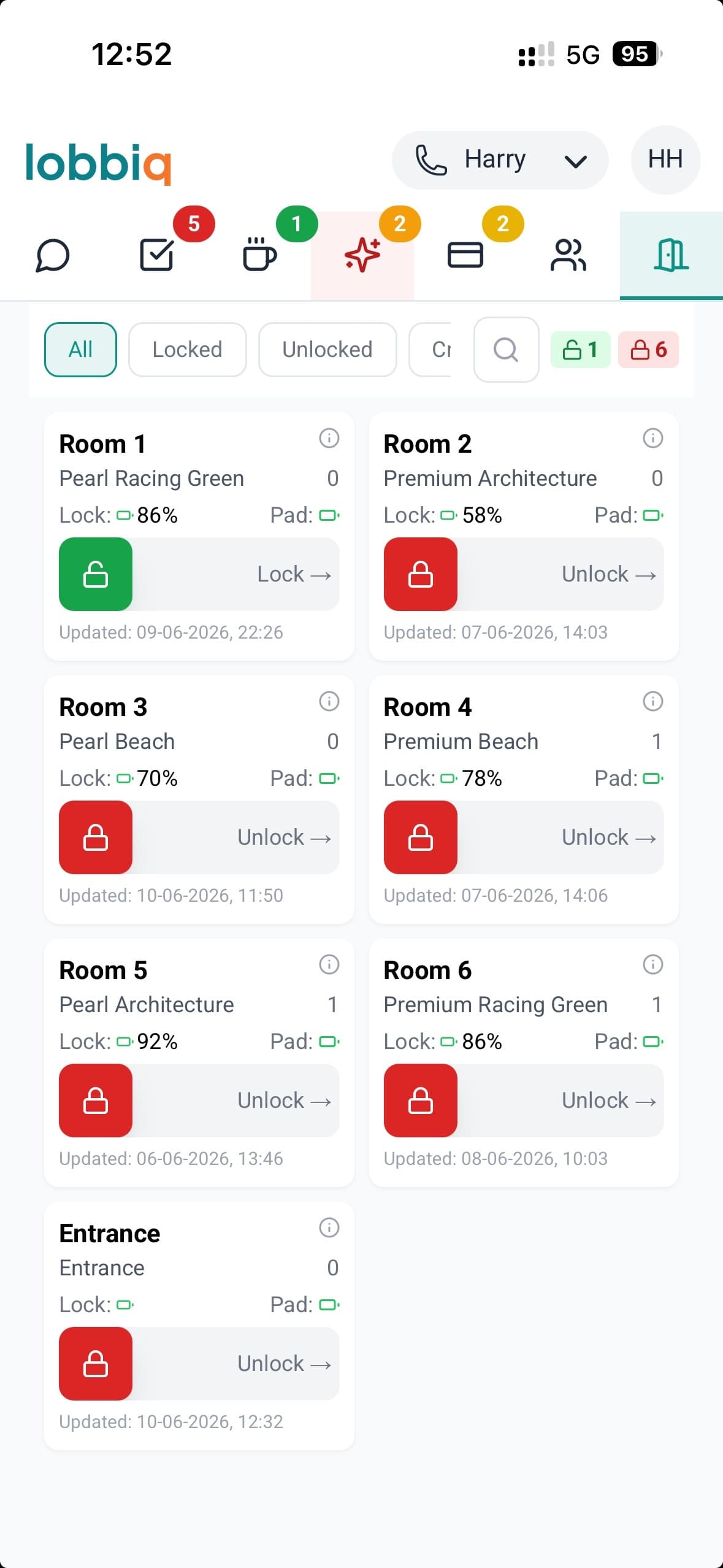
Guest portal
Your hotel in your guest's pocket.
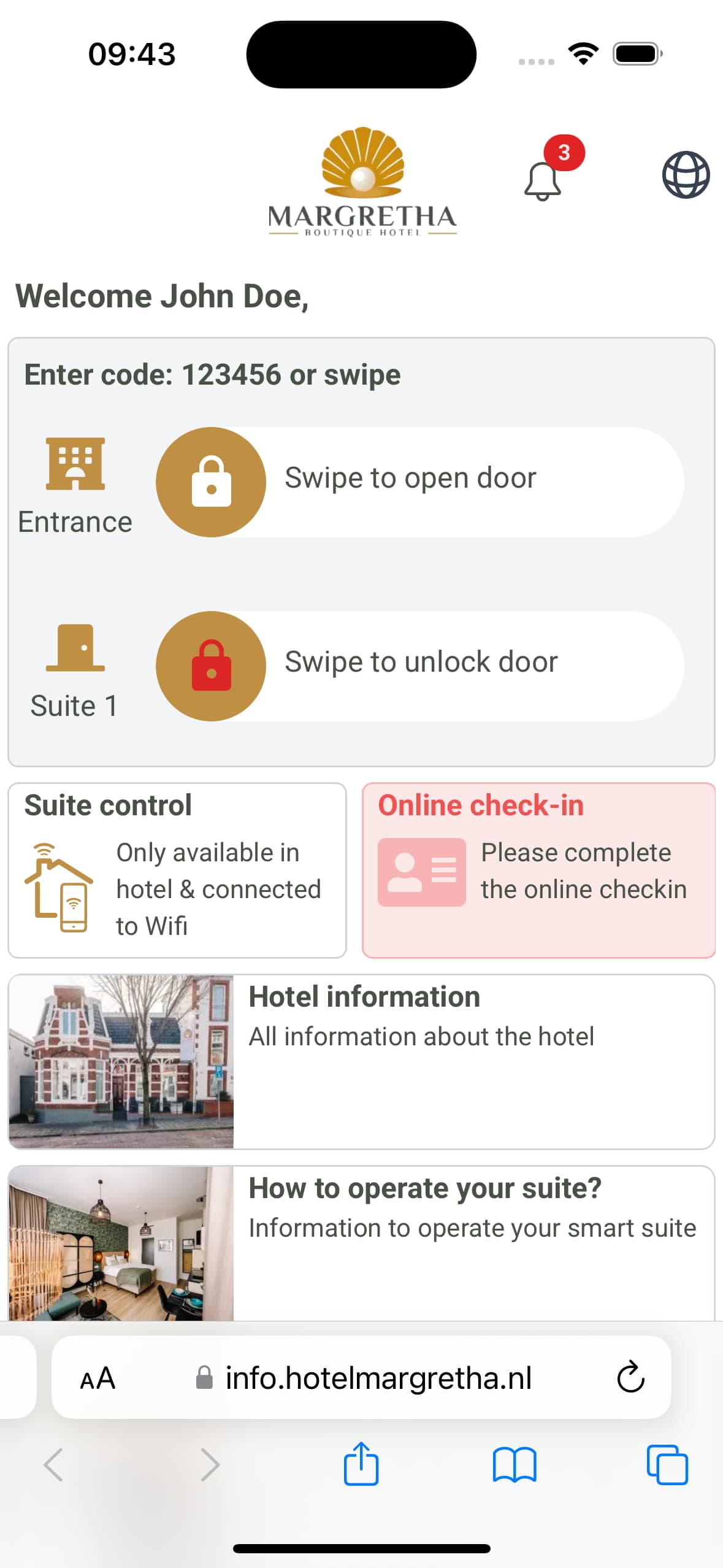
A guest portal in the browser, no app needed. Breakfast orders, requests with their status, opening the door, WiFi and hotel information. Whatever the guest needs at that moment comes first: parking, WiFi and the house rules on arrival day, and early check-in only while it's still possible.
- Status of every requestBlue is in progress, green confirmed and red declined. Guests follow their request from submitted to delivered, and your team sees every request in the Lobbiq app, the most important at the top.
- Upselling in the portalGuests order early check-in, late checkout or parking in one tap and see the status straight away. Revenue without reception.
- Share with companionsGuests share the guest portal via WhatsApp, SMS, email or a QR code. That way every travel companion has it on their own phone, and not everything depends on the person who made the booking.
- Your content, managed by youHotel information, local tips, house rules and your offers: you put them together yourself from building blocks, in every language. What you save appears in the portal straight away.
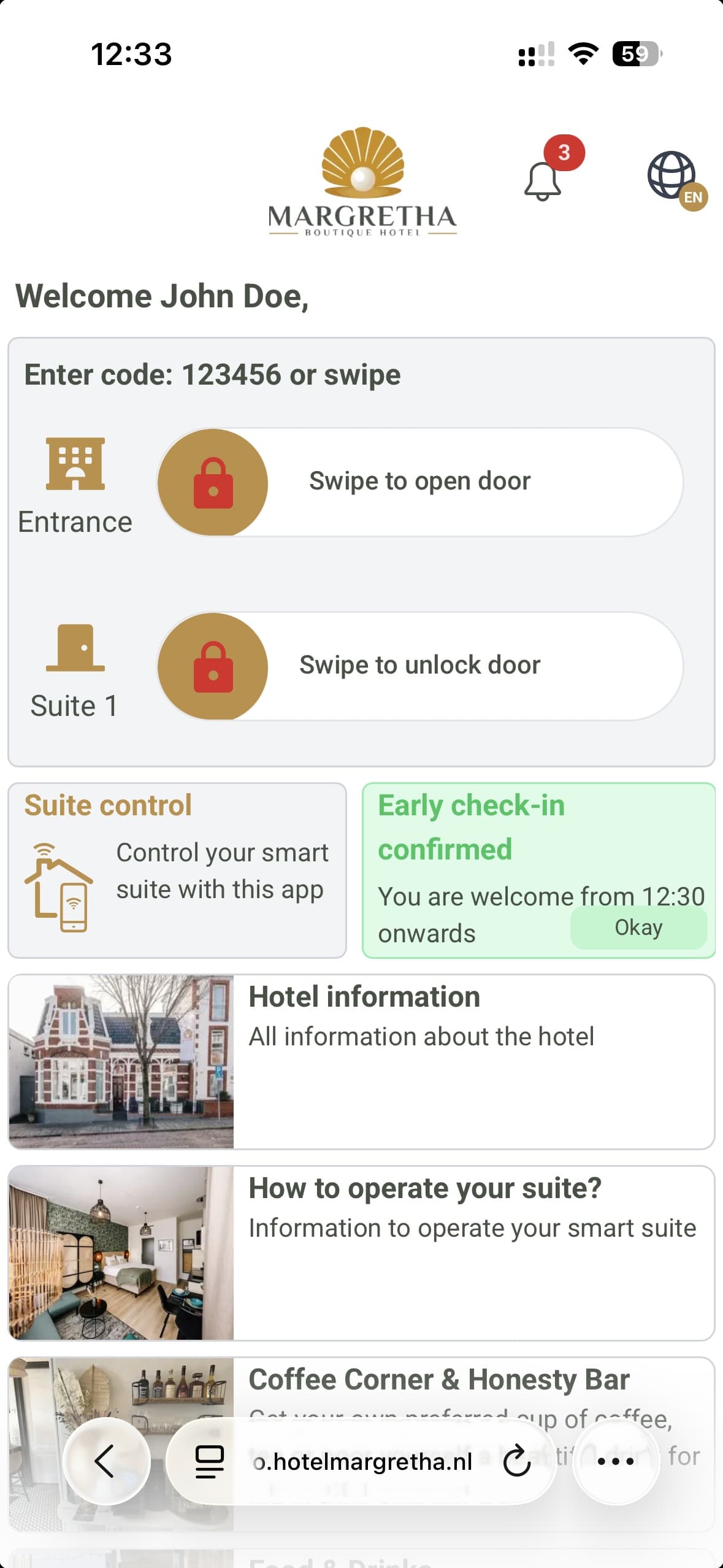
Early check-in, parking and breakfast are ready the moment guests open their portal. Revenue, the elegant way. Want to point a guest to something anyway? Send a push notification in the portal, or a message via WhatsApp or SMS.
Guests no longer call reception for every question. You no longer have to repeat yourself.
Messaging
One Chat Inbox. Every Channel. Every Guest.
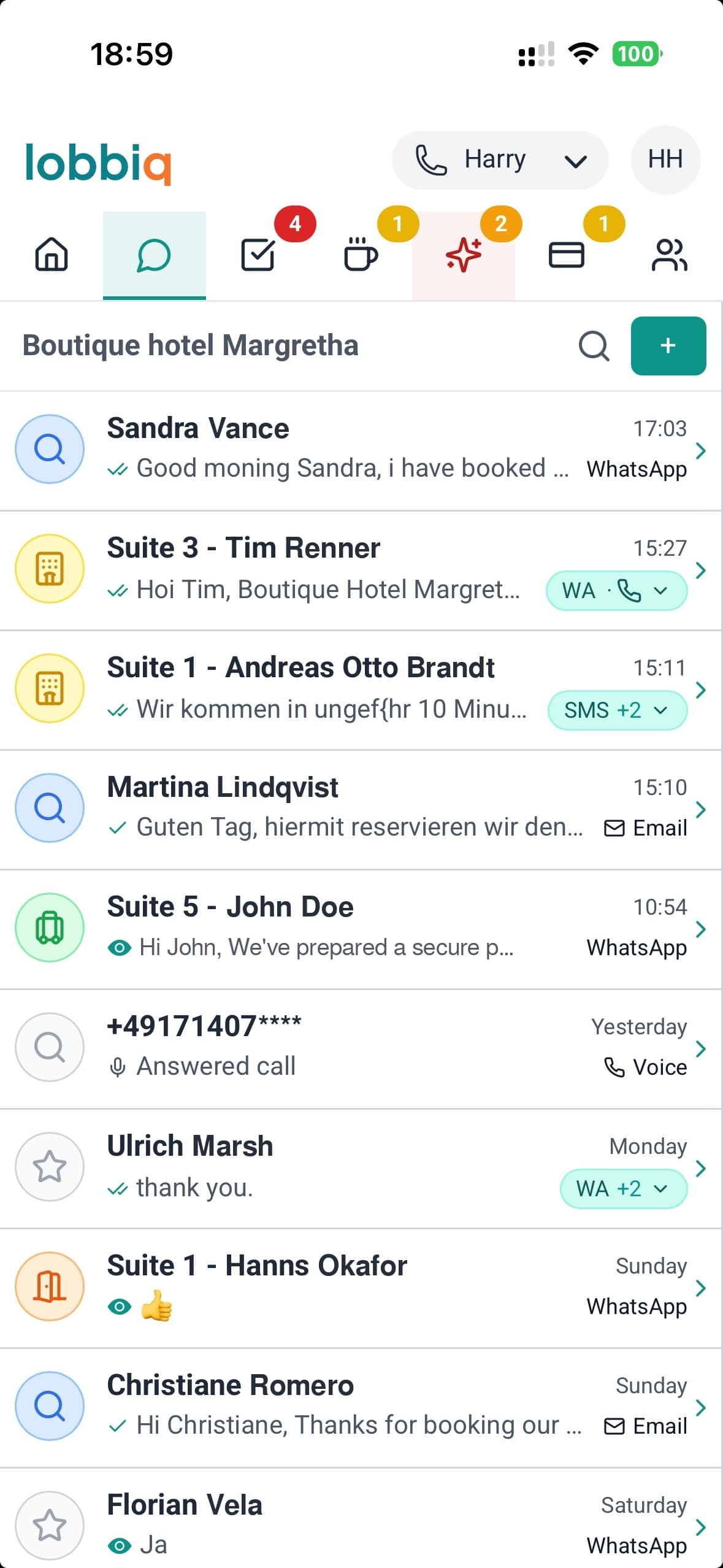
WhatsApp, SMS, email, phone calls, your website chat and messages from Booking.com, Airbnb and Expedia all come together in one chat inbox your whole team can see. No more "who has the phone?" No more lost messages during shift changes.
- One thread per guest, not per channelWhatsApp yesterday, a call this morning, a Booking.com message tonight: one conversation, with their room, their dates and where they are in the stay sitting beside it.
- Automatic language detectionA guest writes in German, you read and write in English, and the AI translates your reply into German. The language comes from the booking and adjusts as soon as the guest writes in another language.
- Templates for every momentSet up a template for each moment, in every language you offer. The guest's name, room, door code and payment link fill themselves in.
- Multi-user shared chat inboxYour team works together in shared chat inboxes. You create a chat inbox for, say, the front desk, a department or a manager who handles escalations, and you decide who sees which chat inbox. Move a conversation to another chat inbox and everything that's been said goes with it.
Smart phone system
Keep your hotel number. Never miss a guest call again.
You keep your own phone number and forward it yourself to the number you get in Lobbiq. From then on, calls go to whoever is on duty, and every call, answered or missed, shows up in the chat inbox alongside that guest's messages.
During the day
Calls are forwarded to the mobile of the team member on duty. If the caller is known, a notification shows who it is and which room it's about.
After hours
Professional voicemail greets your guest in their own language, from "Goedemorgen" to "Bonsoir", to suit the time of day. Lobbiq recognises the language from their phone number.
Emergency menu
Callers can choose the emergency option and go straight to whoever is on duty. If a guest is at a locked door, they open it through the menu with their own code.
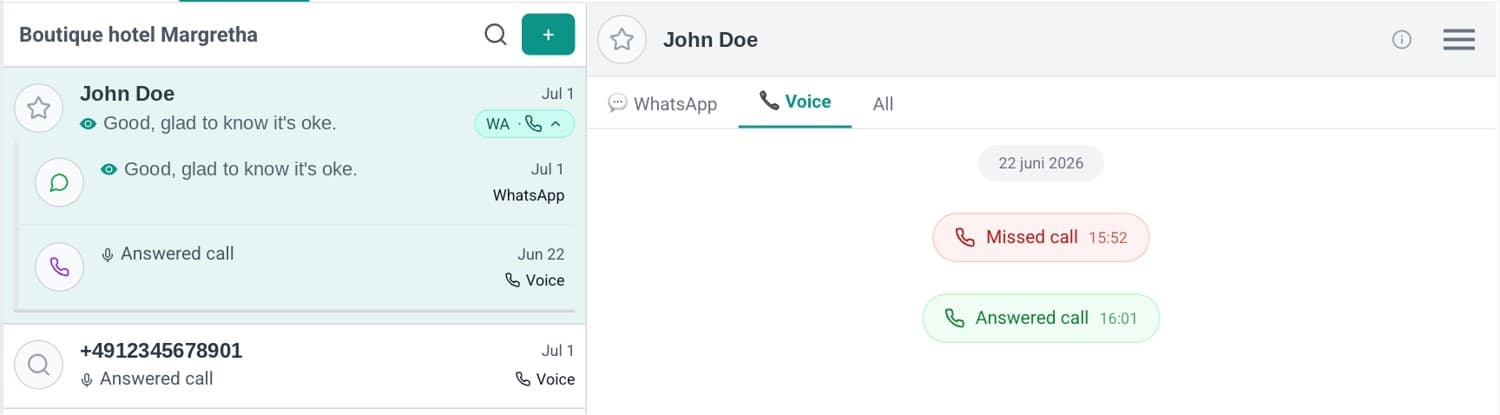
No phone system needed.
No hardware, no installation. It's included in your subscription; you only pay for the calls themselves, per use.
Payments
Get paid without having to be there.
Tourist tax, an extra night or something from the minibar: Lobbiq creates the payment link and sends it in the conversation with your guest, by WhatsApp, SMS or email. The guest pays before checking out, even when there is no one at the front desk.
| Date | Guest | Description | Amount | Provider | Status |
|---|---|---|---|---|---|
| 30 Oct | Emma de Vries | Tourist tax | €7.60 | myPOS | Paid |
| 29 Oct | Lucas Bakker | Extra night | €177.10 | Stripe | Paid |
| 29 Oct | Sophie Müller | Minibar | €24.50 | myPOS | Pending |
| 28 Oct | Noah Jansen | Stay | €396.57 | Stripe | Paid |
| 27 Oct | Mila Peters | Breakfast | €54.90 | myPOS | Paid |
| 26 Oct | Daan Visser | Late check-out | €35.00 | Stripe | Expired |
Automatic or in one tap
Lobbiq creates the payment link itself and sends it to the guest. Prefer to do it yourself? Send a link from the conversation, or charge a card on the spot.
All payments in one overview
Payment links, card payments and a connected card terminal sit together in one list, per guest. You see whether a link has been sent, opened, paid or has expired. Reminders go out automatically, and you spot a failed payment straight away.
Always the lowest transaction fees
Lobbiq works with Stripe and myPOS. If you use both, Lobbiq processes each payment through whichever provider is cheapest for it, without you having to do a thing.
Your own payment accounts
Payments run through your own Stripe and/or myPOS account. That is why you pay Lobbiq no commission, while many other systems charge 1-3% on top of the transaction fees.
Financial reconciliation
Matching your income, costs and payments against your bank statement every month takes hours. Soon Lobbiq will do it for you: everything reconciled with your bank, at no extra cost. We are testing it now in our own hotel and rental business.
Tasks
Nobody typed this list.
Whatever happens becomes a task on its own.
Open the task list on a normal morning and look at the "Who" column. A guest asked about parking. A new booking came in with a wrong phone number. Two guest profiles turned out to be the same person. A door lock battery dropped to 20%.
Everything on that list arrived by itself. Except one line: replace the bulb in the kitchen.
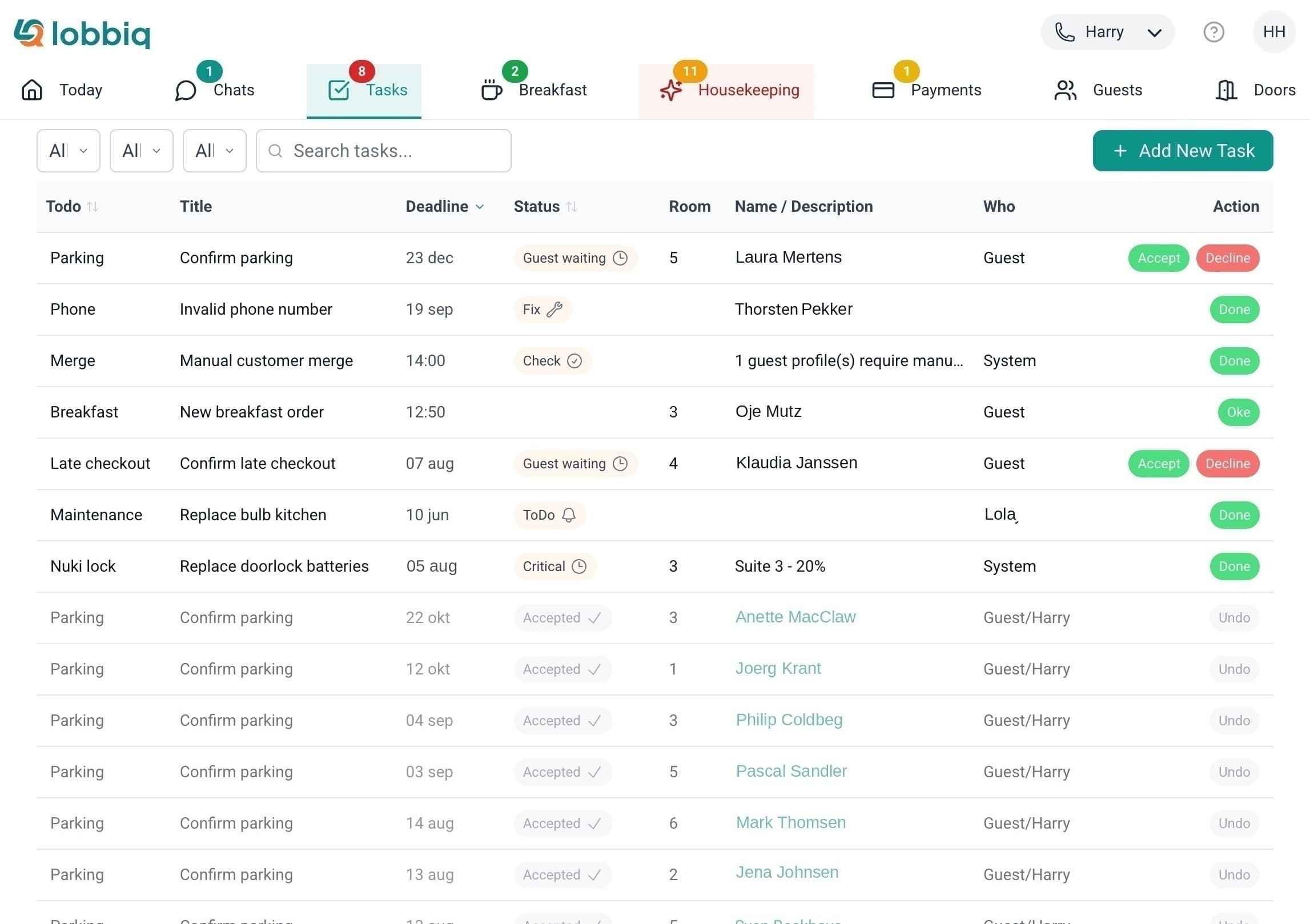
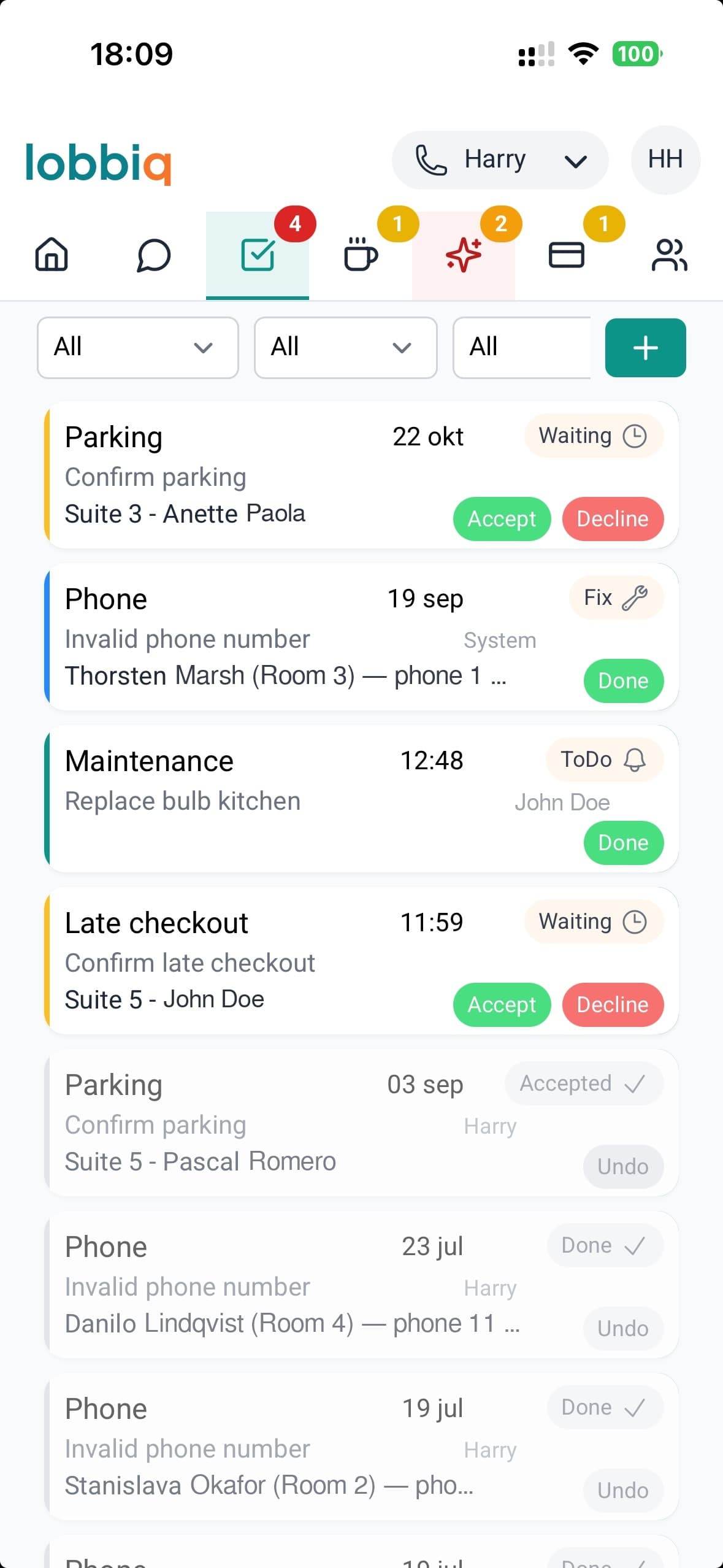
The list fills itself.
A guest asking for a late checkout, a last-minute breakfast order: Lobbiq puts it on the list by itself, with the room, the guest and the deadline attached.
One click handles the rest.
When a guest asks for a late checkout, you click Accept. Lobbiq updates the departure time on the reservation, keeps the guest's door code working for longer and shows it to them straight away in their portal. There's nothing else for you to do.
You decide when you hear about it.
Get a push notification as soon as a new task comes your way, or turn notifications off when you are off duty. If something passes its deadline, the Tasks tab turns red.
Breakfast & kitchen
Every croissant accounted for.
With your rooms, payments and messages, you know exactly what happens. With breakfast, you usually don't: you set out a buffet, guess how much you'll need and never find out who ate what. With Lobbiq, every guest chooses in advance, and the kitchen knows exactly what needs to go on the table.
Still running a buffet?You restock at 09:40. At 10:05 it goes in the bin.
Do the maths on what your buffet costs.
Nobody wants an empty buffet just as a guest walks in. So you put out more than you need, and on Thursday you're already buying for a Sunday when you don't yet know how many guests will turn up.
On average, every hotel guest leaves 116 grams of breakfast uneaten, more than three slices of bread. With twenty guests a morning, you throw away over two kilos every day.
And what doesn't get left behind sometimes leaves in a bag. This summer the papers reported that guests are taking rolls and fruit from the buffet for lunch, now that eating out has become more expensive. You buy it, they take it.
Meanwhile your own costs keep rising, and you can't keep passing them on. Do you actually know what's left of your buffet every morning?
Sources: Hotelmonitor by Samen Tegen Voedselverspilling and Wageningen University & Research, 2026 (via KHN); De Telegraaf, August 2026
What happens in practice
Sustainability matters to your guests too: they don't like throwing food away any more than you do. Given the choice, they cancel the mornings they won't be there themselves, and choose only what they'll actually eat.
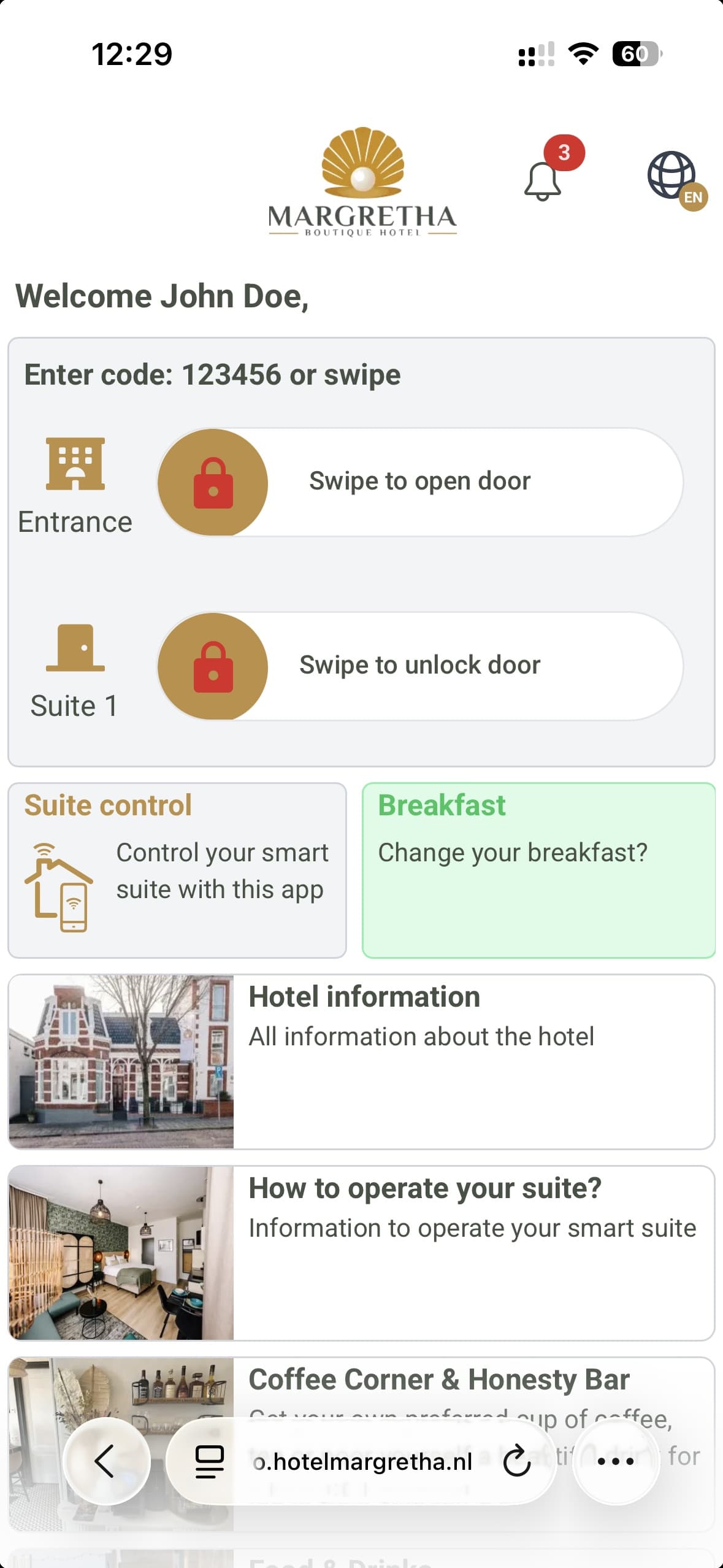
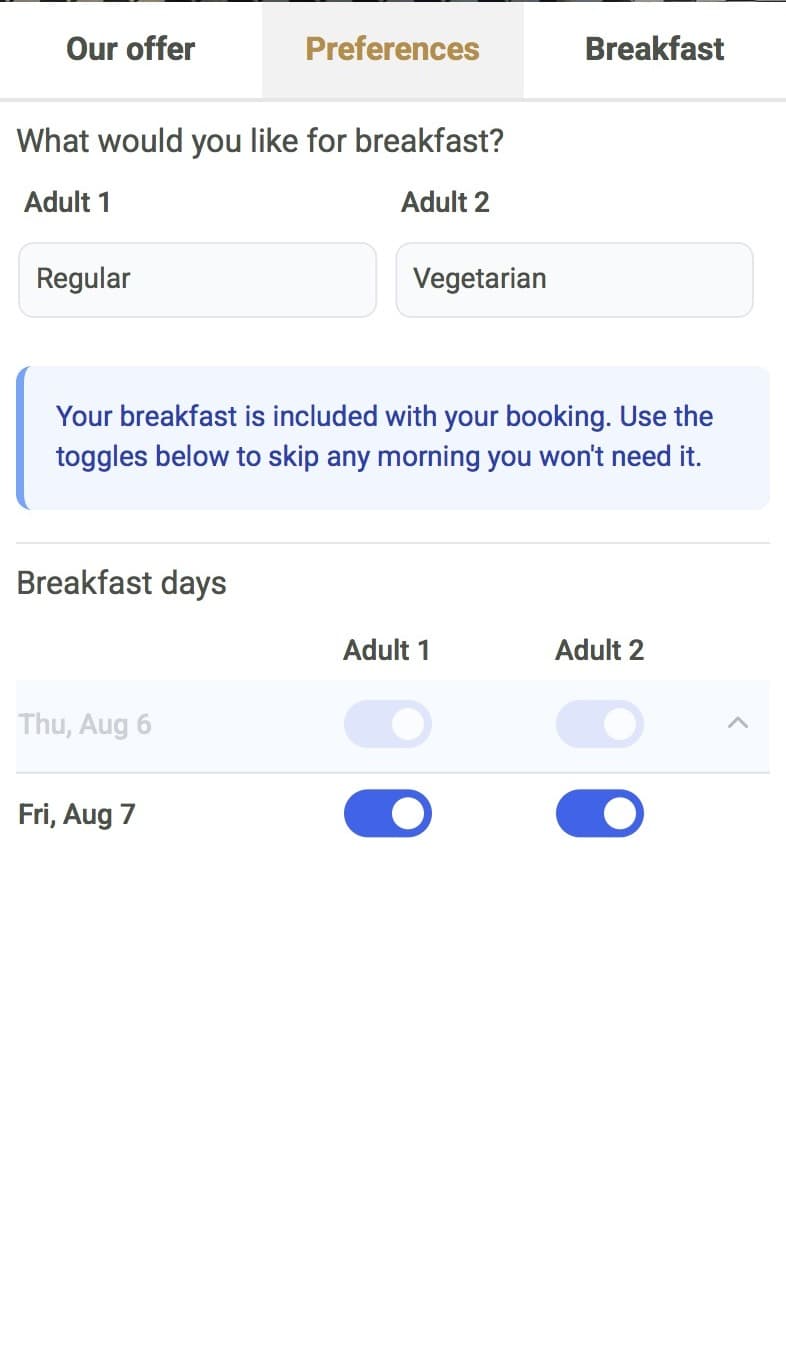
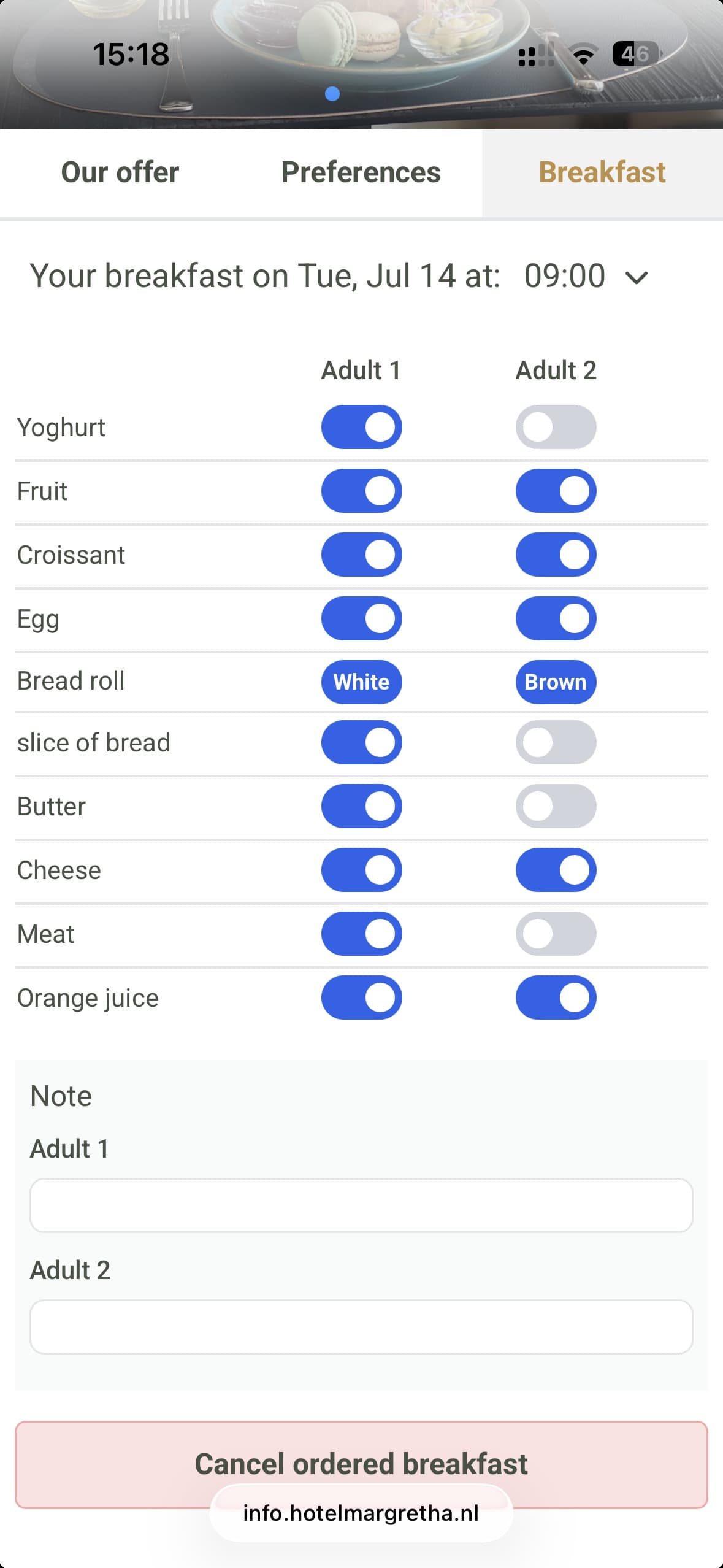
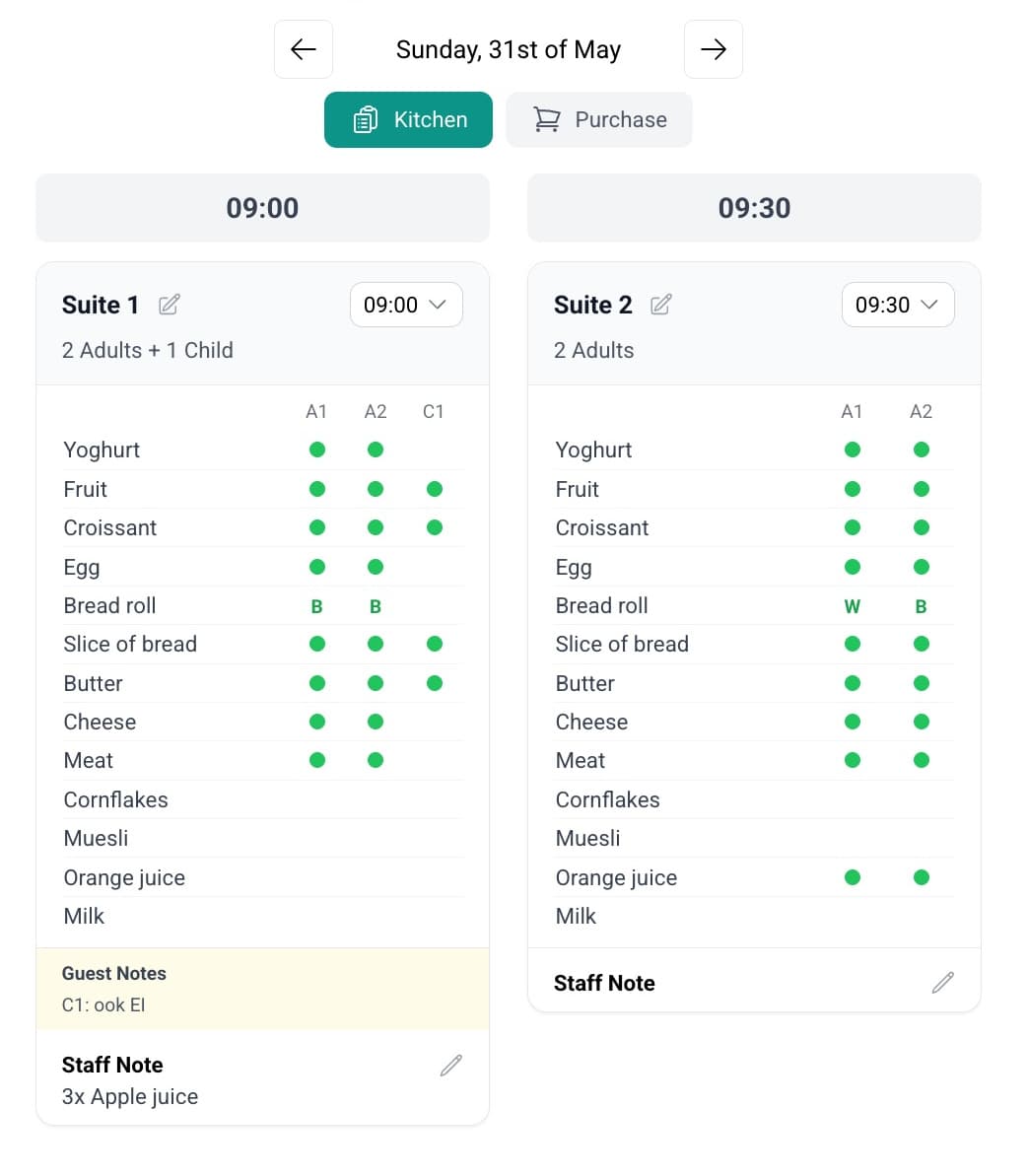
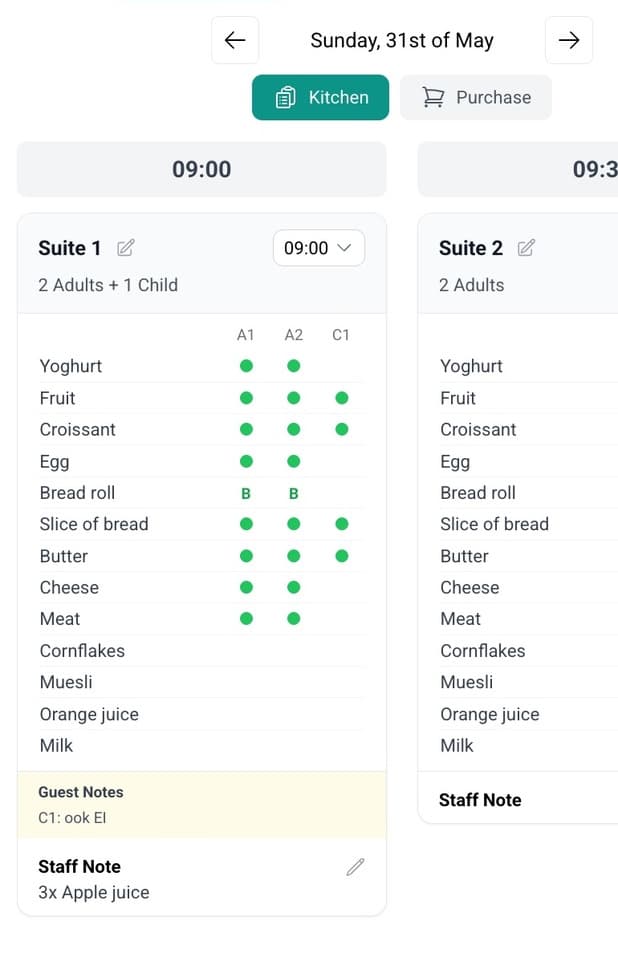
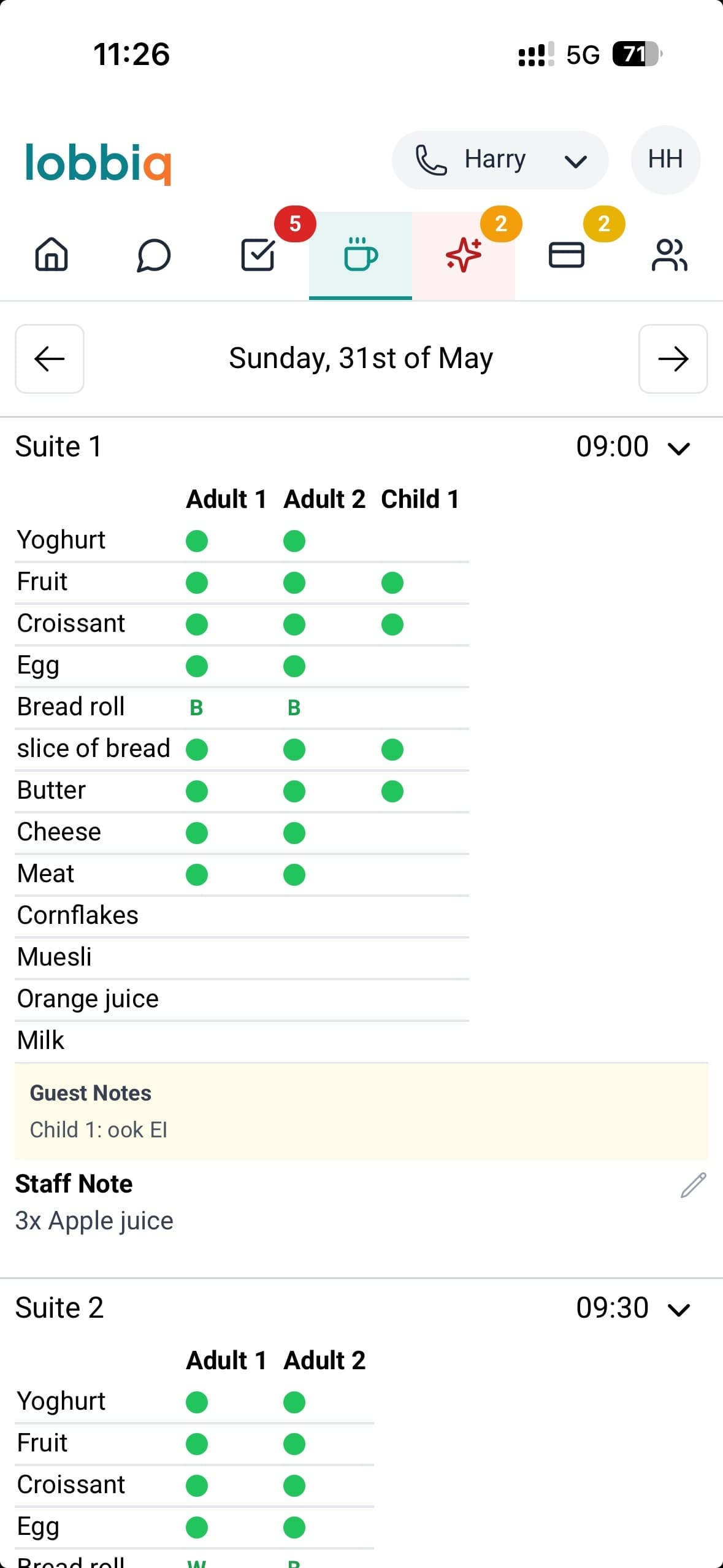
- By time slotWhether you serve breakfast in the room or in a breakfast room, the guest picks a time, and the kitchen sees who gets what for every quarter hour, on the phone too. For a breakfast room, you set a maximum number of guests per time slot.
- The shopping list writes itselfEvery order added up into one printable shopping list.
- Notes for what the list doesn't haveGuests and your team add whatever isn't on the list.
- Your menu, per weekday and seasonSunday isn't Tuesday, and June isn't January: you set the menu per weekday and season.
- Changes without a conversationUntil the deadline you set, the guest changes everything themselves.
We have much less waste than we used to, and guests use it far more than we expected.
Housekeeping
The cleaning schedule fills itself in. Days ahead.
Every booking produces its own cleaning tasks: a checkout clean at departure and stayover cleans during the stay, with no duplicate tasks, in the right order and up to two weeks ahead. If the guest changes dates or rooms, the cleaning moves with them. If they cancel, the cleaning disappears again before anyone makes a wasted trip.
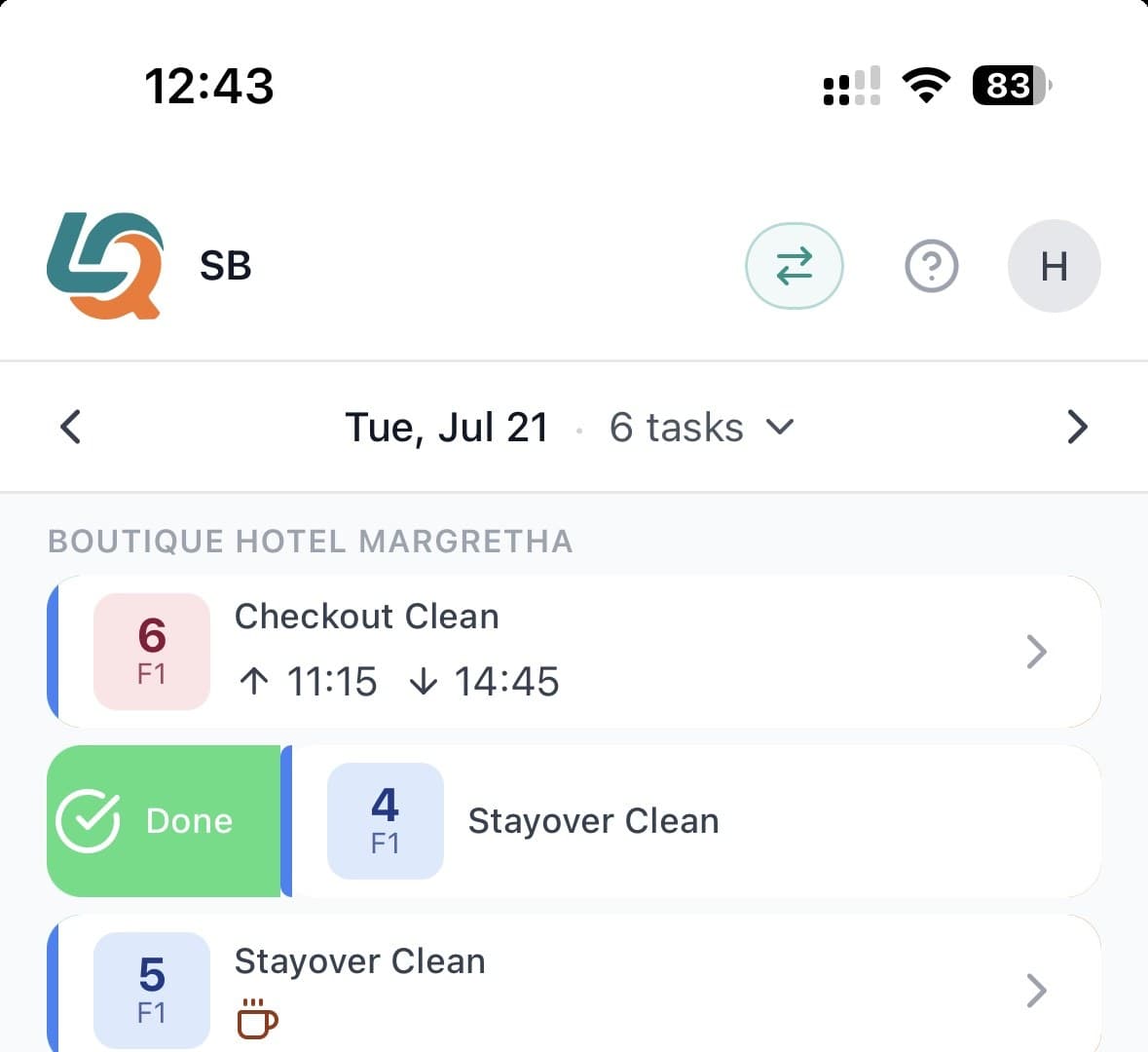
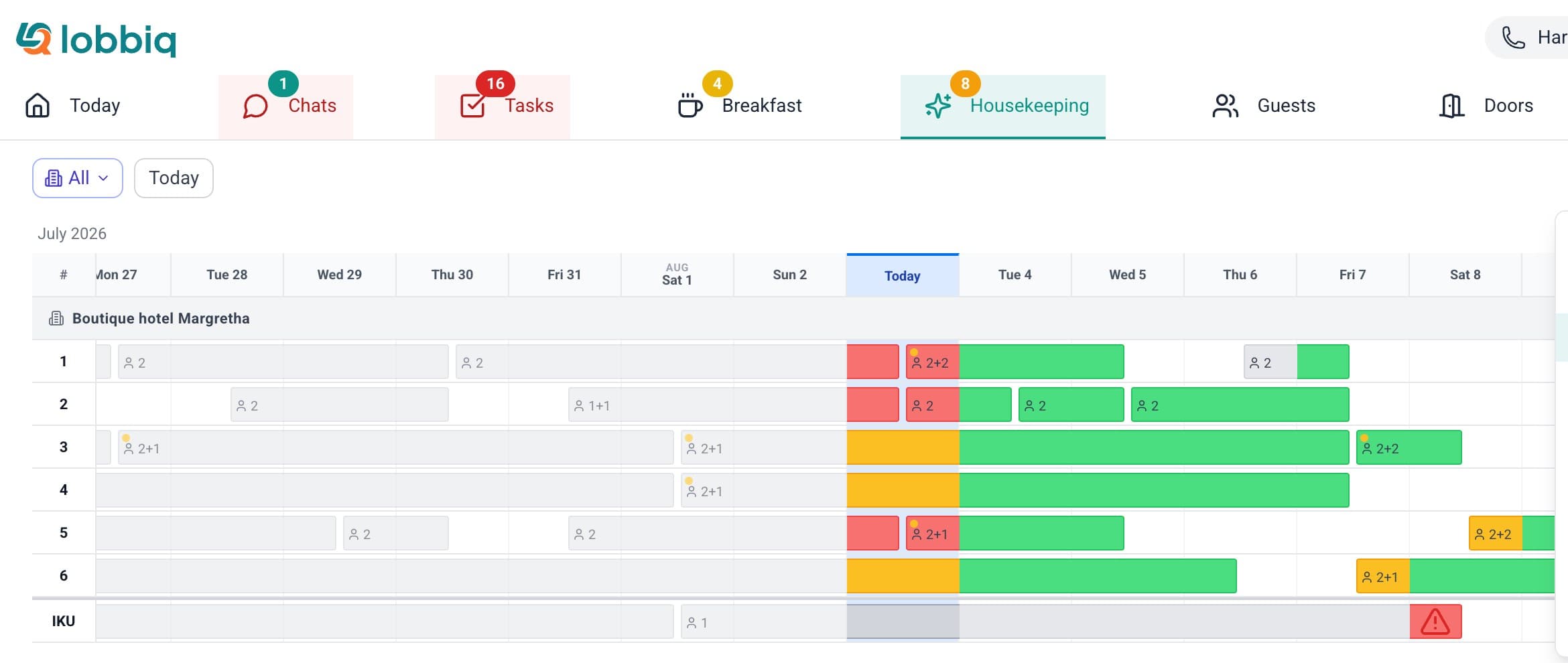
The planning board and the cleaner’s app, with the same tasks.
For you
Stop playing coordinator
- Staff planning: the work shares itself out, even when someone drops out
- Whatever you change by hand stays that way
- Each room shows: to do, in progress, done or inspected
- A notification as soon as a room is done
- Time tracking per task and per cleaner
For your cleaners
They know what to do
- A web app on their phone, in their language, even without signal
- Their own task list, with a checklist for every room
- Details like a late checkout or a cot are right there
- They report damage with a photo, minibar use goes to reception
With your cleaning company
Working together, no hassle
- The company gets its own cleaning portal
- Your cleaning arrives there by itself, next to your own team on one planning board
- Extra work gets confirmed, or your own team takes it over
- Privacy sorted: your guests’ contact details never go to the company
Your guests get answers. Even when you're asleep.
Guest AI
WhatsApp · SMS · email · your website widget
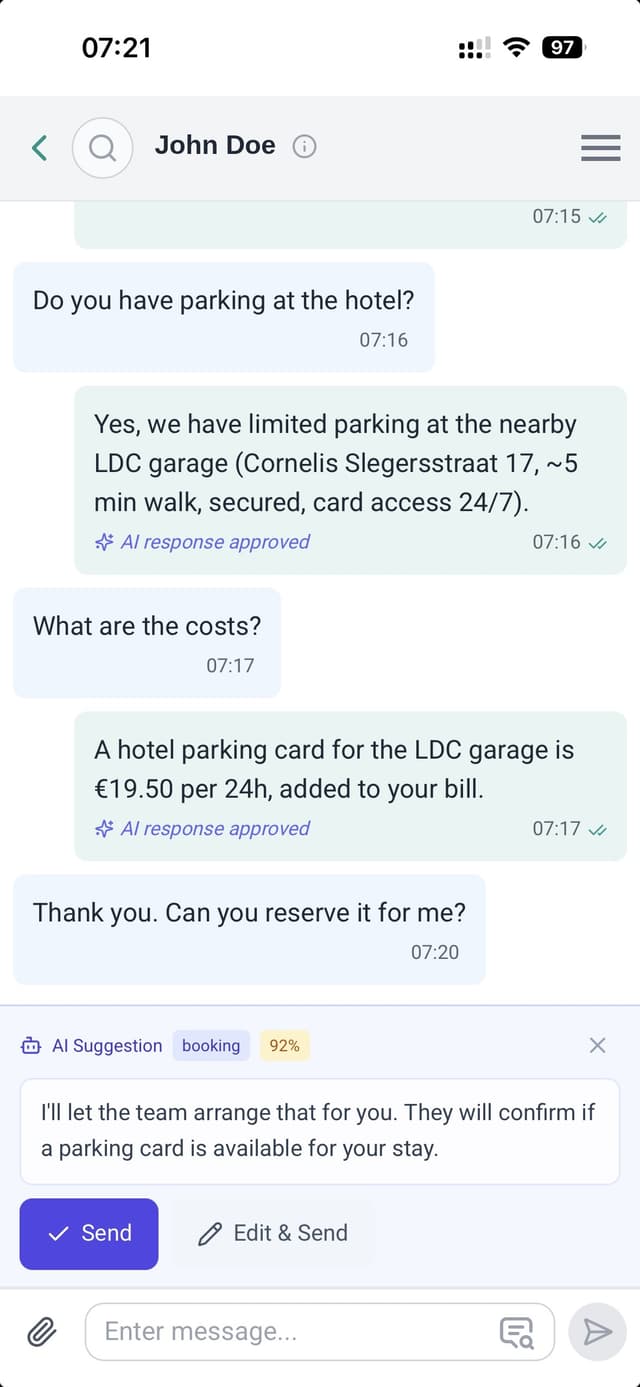
A guest asks about parking at midnight. Wherever that arrives, the AI answers in their own language, from your FAQ and their own booking, not a generic hotel script.
Staff AI
Your dashboard
"Any early check-ins tomorrow?" "How many breakfasts?" "Who hasn't paid the city tax?" Ask Lobbiq in plain language and get the answer without opening your PMS.
Guest portal AI
Coming Q1 2027The guest portal, during the stay
Hotel information, tips for restaurants and activities, and what's happening nearby, from festivals to sporting events. Answered in the portal the guest is already holding.
You stay in control.
You start carefully: at first the AI only makes suggestions, and you test it on conversations you have already had. Meanwhile the AI learns from your hotel, from your FAQ and from every reply you approve or edit.
Once you're happy, you switch on independent replies, one subject at a time. For example parking first, then check-in times. Anything you haven't switched on stays a suggestion for someone to send or edit. Everything lands in your chat inbox, so you can always follow along.
Try it with a real hotel. Right now.
The widget on hotelmargretha.nl is the same AI, in the hotel Lobbiq was built for. Ask about parking. Ask in German. Ask something the AI cannot know, and see what happens.
Open hotelmargretha.nl →Full platform
And that's just the start.
This is in every subscription too. And you simply keep your booking system: Lobbiq works alongside it.
Nothing falls through the cracks
A conversation, a payment, a task and a door code: everything hangs on the same guest and booking. You never have to look things up in three systems.
Everything in one place
What can run by itself, does
The welcome message, the door code and checkout happen by themselves, at the right moment. Once the cause of a task is resolved, Lobbiq closes it itself.
Set and forget
Your guest portal, set up your way
You add hotel info, house rules, local tips and extras to the portal yourself, with building blocks and in your own branding. Multilingual, and live as soon as you save.
Drag and drop
Insight into your business
How guests use the portal, when the phone is busiest, whether your messages arrive, how long cleaning takes and how much time AI saves you.
Overviews per area
Your own offer and prices
Breakfast, parking, early check-in or the minibar: you decide what you offer and at what price, per item or per person per night.
Your offer, your prices
Guest profiles and history
When a guest books again, their earlier stays and preferences are already there. Lobbiq finds duplicate profiles by itself, and you merge them with one click.
Recognised on the next booking
One subscription. One login. One platform where everything talks to each other. Finally.
See it all in action.
Every feature in one platform, from €37.95 per month. A conversation, with no commitment.
Book a demo →